Documentation
Feedback interprets a saved completion. Use
Grade, Scale, Notice, Summary and Highlight for different kinds of result content.
Create quiz feedback
- Open the quiz's Feedbacks tab and select Add feedback.
- Choose a type and enter its title and required content.
- Configure the minimum score and type-specific fields.
- Add answer criteria where needed.
- Save and complete representative attempts to check the output.
Thresholds and answer criteria
Minimum score normally means the completion score must be at least that value. Zero is still a threshold: a negative completion score does not meet a zero minimum. Average-comparison Highlights use their comparison condition instead of the normal score range.
Quiz feedback is considered from higher to lower minimum scores. Grade, Notice and Summary display one matching entry per type. Scale and Highlight can display multiple matches.
Answer criteria can require
Correct,
Wrong or a
Specific response for selected questions. All configured conditions must match. If the question exists but has no saved response, its condition fails. A criterion referencing a deleted question is skipped, so review rules after deleting or moving questions.
Site-wide defaults
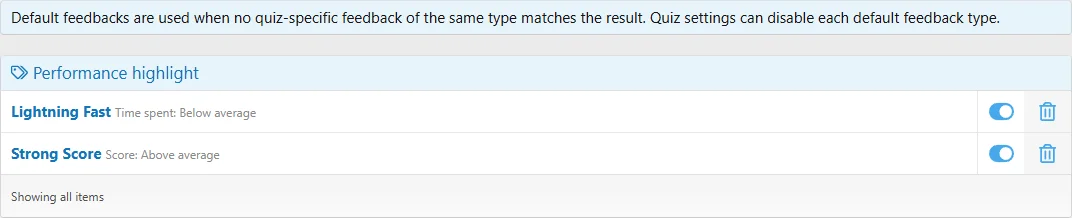
Administrators manage default feedback in the ACP. Each quiz can enable or disable fallback feedback separately for each type. Matching defaults are used only when no quiz-specific feedback of that same type matches; they are not simply appended to matching local feedback.
The installed faster-than-average and above-average-score highlights are manageable default entries. Default feedback can use points or percentage criteria as selected in the ACP; quiz-specific minimum scores use completion points. Default feedback does not offer quiz-specific question criteria.
Manage fallback entries centrally, then choose which types each quiz uses.
Example and testing
Create Grade entries with thresholds 18, 12 and 0 for Excellent, Passed and Review required. Complete attempts at 11, 12, 17 and 18 points and verify the expected label. If negative scores are possible, add a suitable lower threshold.
Test missing answers, overlapping rules and each Specific response. Confirm the result with feedback permission removed as well as enabled.

![[XB] Quizzes: Knowledge Tests & Community Engagement](/data/resource_icons/0/172.jpg?1733558394)