Quiz types ·
Documentation
Ask participants to recognize audio from a short snippet.
Configure
- Select Music quiz in a category that permits it.
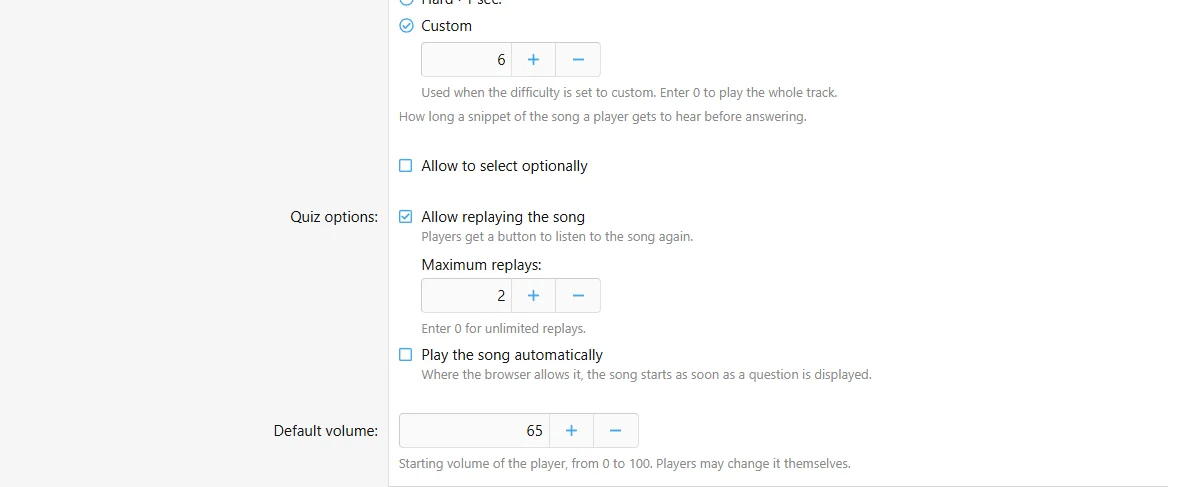
- Configure difficulty, replays, autoplay and volume.
- Add a Music question and attach exactly one supported audio file.
- Set answer choices and the start offset.
- Play and review a completed attempt.
Fields
| Field | Purpose |
|---|
| Difficulty | Easy: 5 seconds; Normal: 3 seconds; Hard: 1 second; Custom: configured duration |
| Custom duration | 0 plays the full track; maximum 3600 seconds |
| Optional difficulty | Allow player selection at the start |
| Replays | Enable replay and set a limit; 0 means unlimited |
| Autoplay | Request automatic playback where permitted by the browser |
| Default volume | Initial volume; the participant can change it |
Configure the music quiz fields in the authoring form.
Behavior and limits
Music quizzes use the dedicated Music question type with single or multiple selection. Each question has its own page. Question import is disabled. Replay controls run in the browser and should be treated as gameplay controls. Site settings determine results playback and optional difficulty score multipliers; Custom uses 1.
Example
A listening round uses six-second custom clips, a start offset at the chorus and two replays per question.

![[XB] Quizzes: Knowledge Tests & Community Engagement](/data/resource_icons/0/172.jpg?1733558394)