Documentation
Transfer question content into an existing compatible quiz. File transfer is different from
copying questions within the site.
| Format | Appropriate use | Limitations |
|---|
| Native XML | Preserve question types, answer data, scoring, type settings, effects, sounds and tags | Does not embed attachment files or transfer a whole quiz and its completion history |
| Moodle GIFT | Exchange supported choice and short-answer questions with a question bank | Has no equivalent for every Quiz feature; unsupported or incomplete exports are identified in comments |
Export
- Open the source quiz's Export questions action.
- Select XML or GIFT and download the file.
- For GIFT, read any export comments identifying omitted questions.
- Keep source attachments separately when preparing a migration.
Import
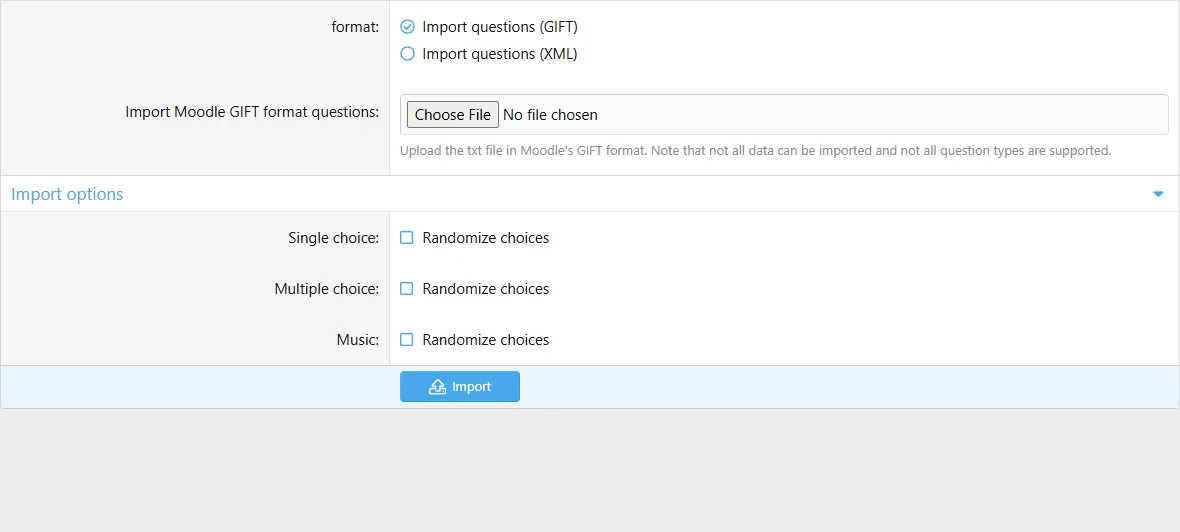
- Open the destination quiz's Import questions action.
- Choose the matching format and upload the file.
- Submit and wait for processing to complete.
- Review question types, correct answers, scores, explanations, tags and moderation state.
- Supply missing attachments and test the imported questions before publication.
Choose the format that matches the file and review the imported question set.
Music quizzes disable question import because every question requires an audio file. XML can retain type settings, but cannot supply missing audio or images. GIFT skips Word builder and other unsupported types. Treat XML as a question-configuration transfer, not a complete media backup.
Imported questions may require approval under site settings. Start with a small file before transferring a large bank.

![[XB] Quizzes: Knowledge Tests & Community Engagement](/data/resource_icons/0/172.jpg?1733558394)