-
Before purchasing:
Please review the product description and compatibility requirements before placing your order. Contact us with any questions to confirm the product meets your needs. Refunds are not available once the product has been downloaded. By purchasing, you agree to our License Agreement. -
You are using an out of date browser. It may not display this or other websites correctly.
You should upgrade or use an alternative browser.
You should upgrade or use an alternative browser.
![[XB] Advanced Forms: Surveys, Questionnaires & Multi-Page Form Builder](/data/resource_icons/0/312.jpg?1777396729)
[XB] Advanced Forms: Surveys, Questionnaires & Multi-Page Form Builder 2.4.2 Patch Level 7
You must log in or register to purchase ($35.00)
- Author Painbaker
- Creation date
- Last bump
- Featured
Improvements
- Added an option to include/exclude admin-only answers in email reports
- Allow numeric questions to show thousands separators while typing, for example 100,000, to help avoid mistyped amounts
Bug Fixes
- Fixed a MySQL 8 error when saving or deleting questions caused by JSON functions on binary type_data values
- Fixed the Post thread button not being replaced with the form button on forums when XenAtendo 2 (Calendar) is enabled
Improvements
- Allow forms to restrict public aggregate statistics to users who submitted a response, optionally combined with selected user groups, with immediate access after a guest registers and claims their response
- Allow optional Linear Scale answers to be cleared by clicking the selected choice again
- Allow numeric questions to display an optional prefix or suffix on statistics values
- Added per-question response visibility controls for showing answers everywhere, only in aggregate statistics, or only to administrators and the submission owner
Bug Fixes
- Fixed unanswered placeholders being included in response counts and percentage calculations in question statistics
- Fixed an SQL error when saving question types that cannot be used as conditional triggers
- Fixed dropdown answers being lost when navigating between form pages, including typed, pasted, and preselected read-only values
- Fixed autosave and guest save-and-continue failures caused by network errors, invalid server responses, or interrupted requests
- Fixed draft creation and submission concurrency issues, including failed locks, duplicate submissions, and duplicate purchases
- Fixed lost or overwritten draft answers during autosave recovery, session merging, guest draft transfers, and concurrent edits
- Fixed leading zeros being removed from text answers when recovering unsaved drafts
- Fixed false draft conflicts caused by lost save confirmations, validation or CAPTCHA errors, tab switching, and background autosaves
- Fixed draft revision and conflict handling across page navigation, final submission, guest save-and-continue, and anonymous identity changes
- Fixed conflicting answers being silently overwritten instead of preserving changes and offering reload or overwrite options
- Fixed edits made during pending form submissions being lost
- Fixed pages containing only answers cleared during a later submission edit remaining visible
Important: This version now requires [XB] Core Library.
The Core Library also adds an optional xenBaker branding link to the badges help page and member badge tab. The branding is enabled by default and can be disabled in the add-on options without payment.
- Replaced the bundled Font Awesome icon picker with the shared [XB] Core Library implementation.
- Prevent confirmation emails from overriding the configured mail sender address.
- Improve the form list on narrow screens by reducing fallback icon size and hiding the activation toggle.
- Display form headings between answers in public responses, submission summaries, and submission logs.
- Add an enabled by default option to exclude unanswered responses from pie charts and their statistics summaries without changing individual responses or reports.
- Allow optional Yes/No answers to be cleared by clicking the selected choice again, including when they trigger conditional questions.
- Add an enabled by default option to hide unanswered text questions and responses from statistics without changing individual responses or reports.
- Add an enabled by default option to hide submitter usernames and IP addresses from public submission log views while retaining them in the Admin Control Panel.
- Allow each form to configure how long a guest has to finish logging in or registering after choosing to save a response to their account.
- Add an optional global setting to include a protected edit or account-claim button in submission confirmation emails.
- Preserve the unanswered label when editing a submission without answering that question.
- Fixed Numberbox limits, accepted zero for required numeric answers, enforced numeric steps on submission, and placed validation messages below the number controls.
- Separated submission details from answer editing so changing the submitter or date does not alter responses.
- Respect conditional questions and page jumps when editing responses, including cleared selections and empty Other answers, and validate unanswered required matrix questions correctly.
- Preserve conditional answers when a select is empty, save and display cleared agreement checkboxes correctly, and allow response editing with required file uploads.
- Validate date and time comparisons when either related answer changes.

- Added Likert matrix questions with a shared five-point agreement scale and per-statement statistics
- Added 15 configurable pie chart colors in style properties
- Added displaying page jump destinations and triggering answers in the question list, including unconditional jumps for hidden questions.
- Grouped questions by page in public and ACP submission editors, preserving their order within each page.
- Display the completion summary, submitted answers and question statistics in the survey's page and question order, including questions added later.
- Fixed an error when displaying checkbox answers with the Other option in public response statistics.
- Fixed pie chart tooltips displaying an HTML element name instead of the answer label and value.
- Fixed long pie chart legend labels clipping the chart in statistics cards.
- Fixed an error when viewing statistics for checkbox answers saved with the Other option.
Full changelog:
This is a major update for Advanced Forms, introducing persistent auto-save, conditional page navigation, discount coupons, new question types, submission analytics, and a much richer multi-page form experience. It also brings major improvements to form management, import/export, submission logs, statistics, and the underlying question system.
Smarter Forms, Better Submission Experience!
- Added per-form auto-save, saving responses after every field change and restoring progress across devices for signed-in users or during the current session for guests
- Added an accessible save status indicator
- Added conflict protection when editing the same draft in multiple tabs
- Added an action to discard saved progress
- Added automatic cleanup of expired drafts
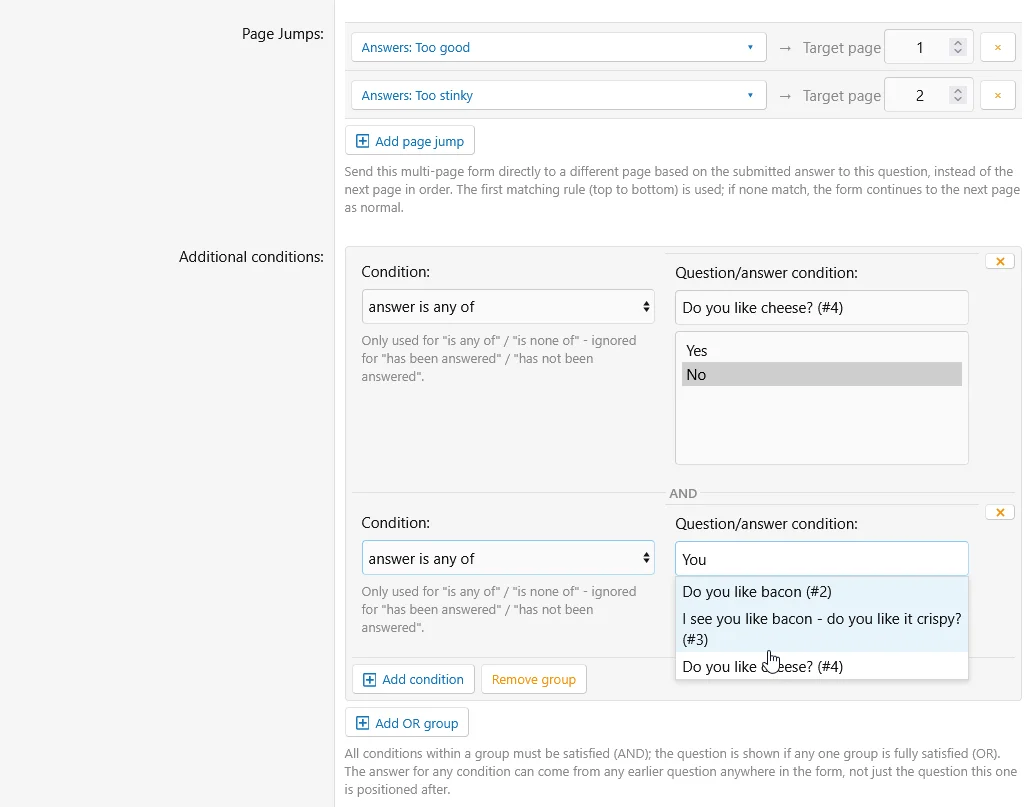
- Added page jump rules for multi-page forms, allowing answers to send submitters directly to another earlier or later page instead of following the normal page order
- Hidden questions can also perform unconditional page jumps without checking an answer
- Expanded conditional question logic:
- Conditional questions can be triggered by multiple selected answers
- Additional AND-conditions can be grouped into OR-groups
- Existing questions can be converted into conditional questions without recreating them
- Added a Change type action while creating regular and conditional questions
- Added new question types:
- Address with an interactive OpenStreetMap picker, address search, marker placement, browser location support, and address/coordinate capture
- Email with email address validation and optional checking against the site's banned email list
- Phone Number with configurable input masks, server-side validation, optional regular expression validation, international number support, and tel: links in reports
- Rating using XenForo's standard star rating interface with a configurable rating scale
- Range / Slider with configurable minimum, maximum, step, live value display, and optional unit label
- Linear Scale with configurable minimum and maximum values, endpoint labels, and four display styles
- Range or Exact Number, allowing submitters to select a configured range or enter an exact number
- Hidden for securely passing fixed values or submitter attributes to reports without displaying an input on the public form
- Likert Matrix with a shared five-point agreement scale and per-statement statistics
- Added submission answer editing with a full edit history:
- Administrators with the new "Edit Form Submission Answers" admin permission can edit any submission's answers from the ACP submission log
- Forms can optionally allow the original respondent to edit their own answers, with an optional time window after submission
- Respondent editing respects the form's start/end dates by default, with an option to allow editing regardless of those dates
- Every changed answer records who changed it, when, and the previous and new values
- Respondent edits use a dedicated Update responses action and alert form watchers when an answer changes
- Update alerts link to individual responses when permitted, otherwise to the survey statistics
- Respondent edits also notify the form's configured Alert Recipients
- The Edit answers action on the completion page amends the submission that was just logged instead of recording a second one
- Editing a submission shows unanswered and newly-added questions even when its original page jumps skipped their pages
- Edited submissions are marked as such in the submission list and show their last edit date in the submission view
- Added an optional per-form guest Save and Continue flow with private resume links, configurable retention, and optional email delivery without requiring an account
- Added an opt-in per-form submission identity selector with fully anonymous, private account-linked, and publicly attributed modes
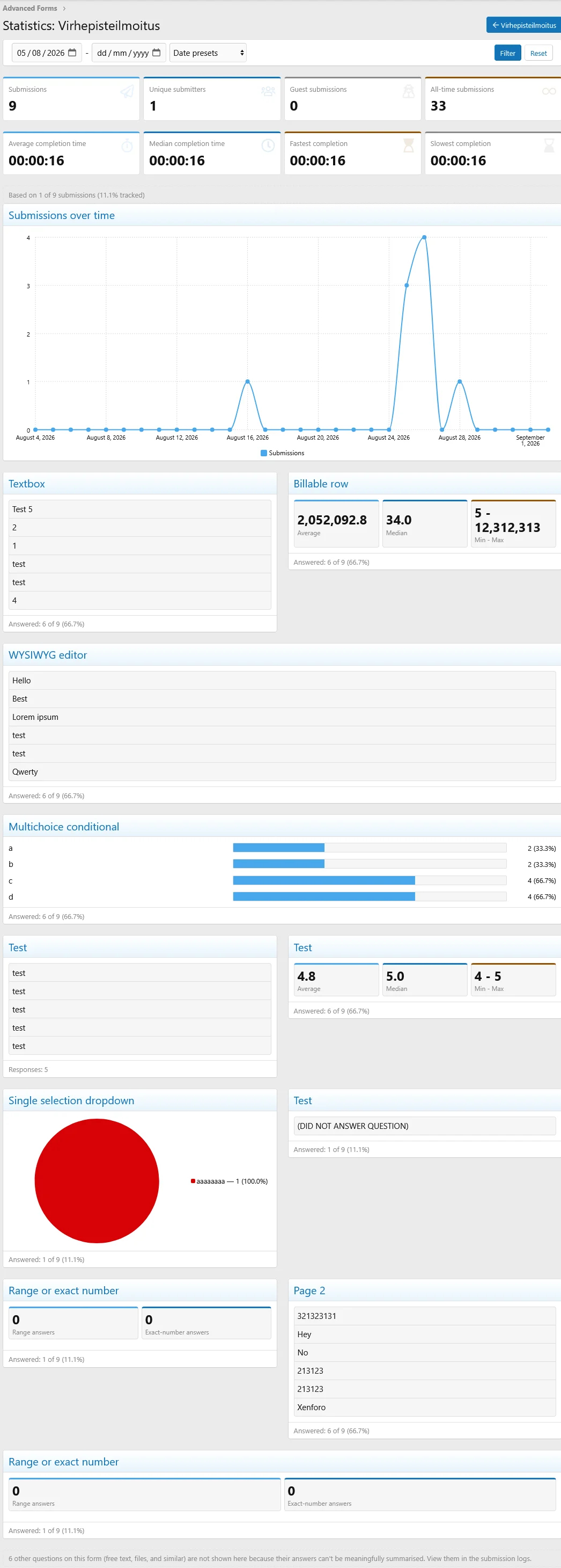
- Added opt-in public form statistics, with configurable access permissions and automatic exclusion of admin-only questions
- Added an optional Responses tab allowing permitted signed-in users to browse individual submissions while keeping admin-only answers and private submitter identities hidden
- Added a Watch option on the statistics page for alerts and optional emails about new submissions
- Added per-statement statistics for Likert Matrix questions
- Added active completion-time tracking for form submissions, including draft/resume continuity, payment-delay exclusion, average/median/fastest/slowest statistics, log display, and CSV exports
- Added an ACP Forms Overview with:
- Submission and unique/guest submitter statistics
- Submissions-over-time chart
- Form activity and revenue leaderboard
- Payment funnel for paid, awaiting payment, and refunded submissions
- Identification of active forms with no submissions or hidden from the public list
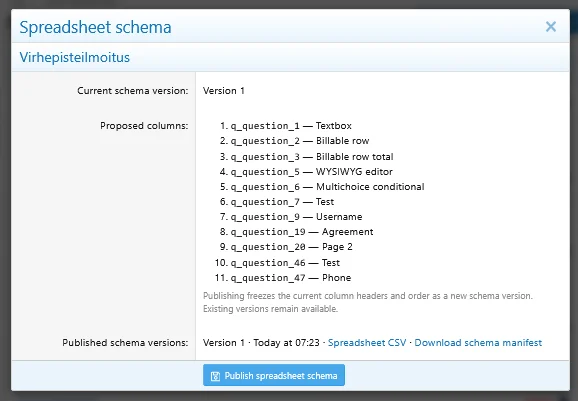
- Added versioned spreadsheet CSV export for per-form submission logs, with stable question column keys, immutable schema versions, and downloadable schema manifests
- Added discount coupons for purchasable form submissions, including:
- Percentage and flat discounts
- Overall and per-user usage limits
- Valid from/until dates
- Form and payment profile restrictions
- User criteria
- ACP coupon management and usage logs
- An option to require a coupon for specific forms
- Added customizable per-question non-answer options for text and number-based fields
- Added an optional submission confirmation page showing a summary of submitted answers and a link back to the prefilled form
- Added an optional printable form preview showing all pages, configured answer choices, and nested conditional questions without creating or modifying a draft
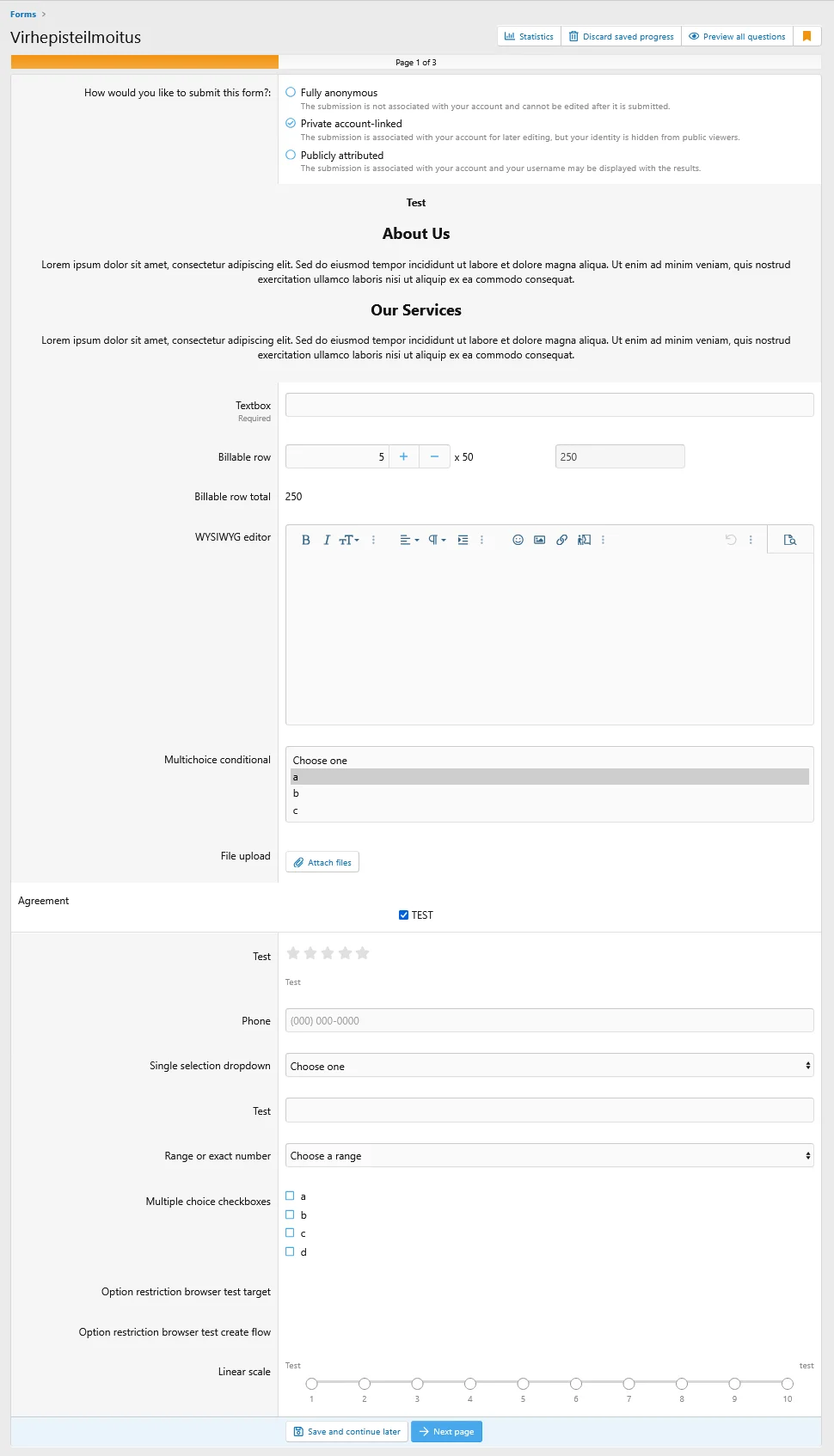
- Added a page progress indicator for multi-page forms showing the current page and overall completion progress, with configurable positioning
- Added expanded public form cards with list/grid display modes, submission requirements, identity options, expiry details, and resumable draft status
- Added optional post-submission webhooks per form, asynchronously sending submission data as JSON to configured URLs
- Added Alert and Push notification report types for notifying configured users when a form is submitted
- Added a searchable question picker to the ACP condition builder for forms with long question lists
- Added a question batch action for copying selected questions to another form, including remapping dependencies between copied questions
- Added a Restrict options source setting for Checkboxes questions
- Added optional type-ahead choice search for Single Selection Dropdown questions
- Added an Other... option for Single Selection radio questions
- Added optional answer clearing for selection questions
- Clicking the selected option again clears a non-required Single Selection Radio question
- Multiple Choice Dropdown and Multiple Choice Checkboxes questions provide a Clear selection action
- The behavior can be disabled per question
- Added per-question Choice columns for Checkboxes and Single Selection questions
- Added configurable minimum and maximum values for Number questions and inline validation feedback for Regex and numeric constraints
- Added a per-form custom error message for visitors who do not meet user criteria
- Added per-form Font Awesome icons with optional styling
- Added cached form-type links to the Forms sub-navigation
- Added direct access to Advanced Forms options from the add-on's ACP navigation section
- Added a style property for displaying completion-page actions above the answer summary, below it, or in both positions
- Added 15 configurable pie chart colors in style properties
Changes
- Dropped XF 2.2 support
- Reworked question ordering and management:
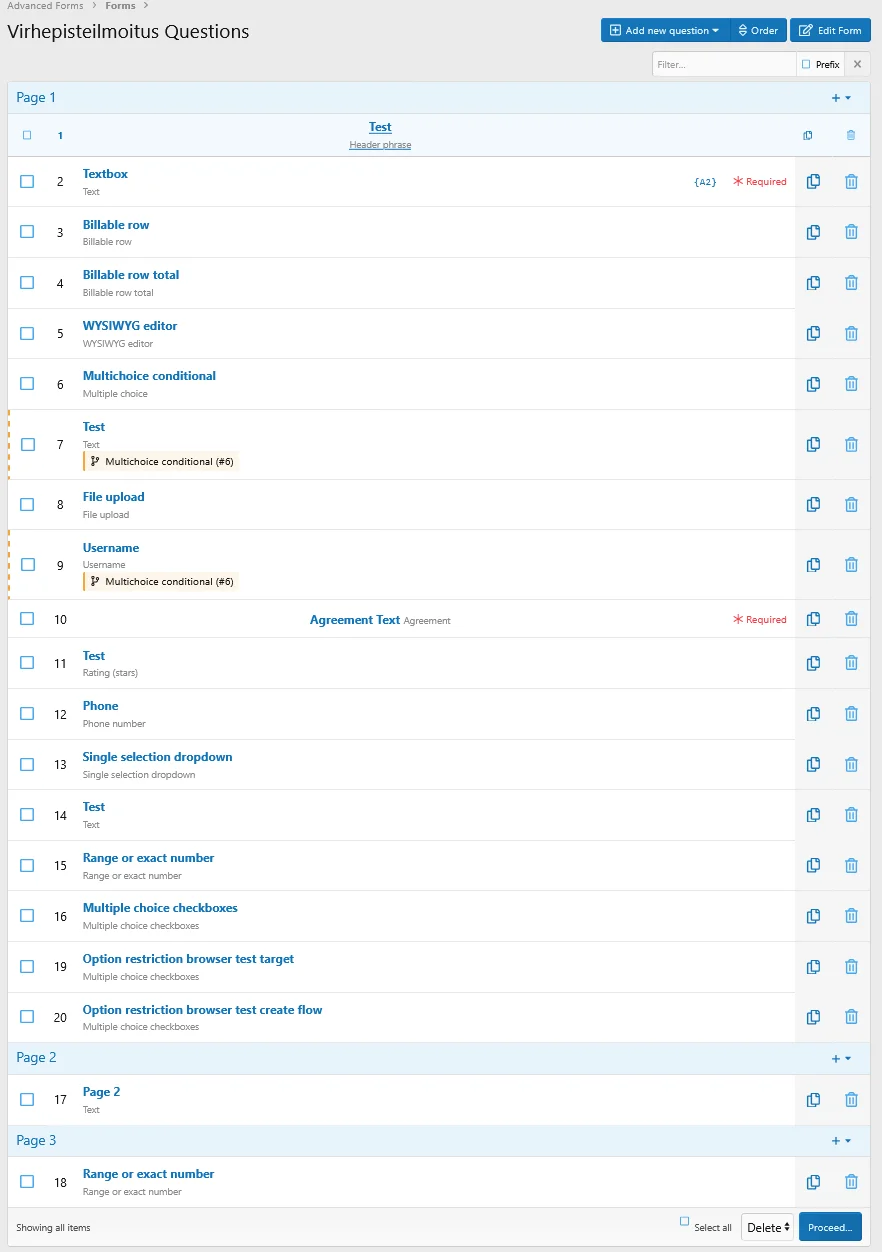
- Questions are organized into fixed page groups and can be moved between existing form pages
- Questions are grouped by page in public and ACP submission editors while preserving their order within each page
- Page jump destinations and triggering answers are displayed in the question list
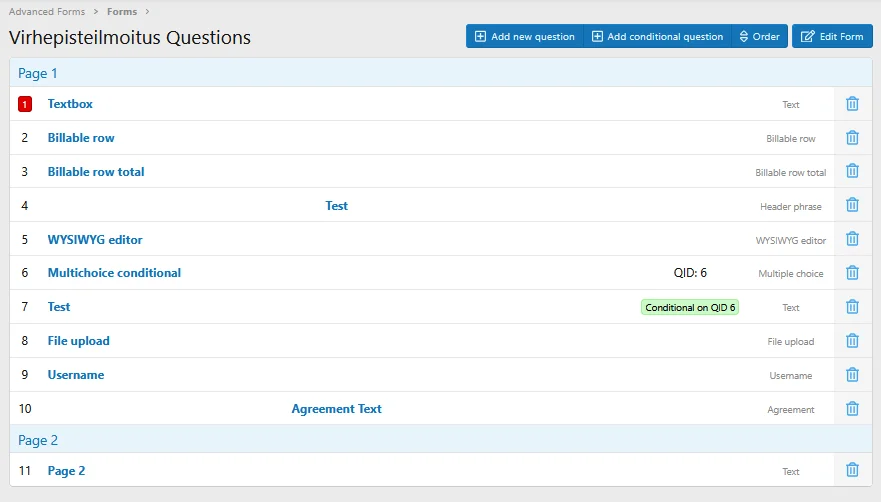
- The ACP question list uses a condition tree that preserves display pages and identifies cross-page trigger relationships
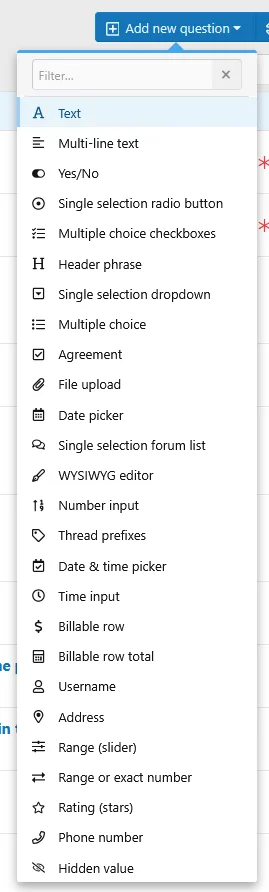
- Question-type menus load through AJAX with searchable and scrollable type lists
- Added checkbox selection and batch deletion
- Administrator-facing question numbers use each question's sequential position within the form
- Reworked form import/export to follow XenForo's XML import/export conventions
- Forms export their questions, question type data, and form type together
- Maintained import compatibility with files exported by earlier versions
- Added a form-selection overlay for exporting multiple forms to XML
- Reworked spreadsheet and CSV exports:
- Added form, user, date range, and result limit controls
- Added drag-and-drop column ordering when publishing a new spreadsheet schema version
- Added an option to generate default export column keys from question text
- Simplified spreadsheet metadata columns to log_id, Timestamp, Username, and IP
- Added clearly labeled Spreadsheet CSV and schema actions
- Added single-file CSV export using the currently active filters
- Stored answers retain question and export snapshots
- Spreadsheet values use predictable machine-readable formats
- Reworked the ACP form list with hierarchical rows, larger icon previews, selection controls, batch actions, and XML export selection
- Reworked ACP submission log filtering to use XenForo's native filterer and added sortable submission and last-edit date columns
- Reworked the submission log into a responsive XenForo data list with dedicated form, submitter, and date columns, plus inline answers
- Reworked the public statistics Responses view
- Multi-page form answers are now validated when moving between pages instead of only during final submission
- Hidden or unreachable conditional answers are removed from drafts, purchases, and final submissions when the active condition path changes
- Reworked question types into extensible definitions with dedicated handlers for validation, answer rendering, and report formatting
- Added individual text responses to per-form statistics for single-line, multi-line, and rich-text questions
- Added a style property controlling the minimum number of preview choices required before using four columns
- Displayed preview choices in four columns for dropdown, multi-select, radio, checkbox-list, and range-or-exact questions
- Clarified ACP question requirements, report-title tokens, and conditional rules
- Updated public terminology from PC and Conversation to DM and Direct Message
- Hidden empty or zero prices and attachment limits from the public form list
- Fixed completion summaries, submitted answers, and question statistics not consistently following the survey's page and question order, including questions added later
- Fixed ACP submission editing requiring answers from pages skipped by conditional page jumps
- Fixed skipped, unanswered, and newly-added questions being omitted when editing existing submissions
- Fixed answers that become hidden after conditional changes not being cleared correctly
- Fixed the ACP form submission log defaulting to the current administrator's submissions when opened from a form action
- Fixed submission log actions implicitly filtering results to the current user's submissions
- Fixed form watch and report notifications linking to the wrong destination instead of the submitted response when the recipient can view it
- Fixed page-jump validation using a stale page value instead of the submitted page ID
- Fixed Hidden-question page jumps being removed while pruning transition rules
- Fixed Previous/Next navigation scrolling below the form title
- Fixed guest Linear Scale and Single Selection values being reset during page navigation or reload
- Fixed guest draft recovery retrying indefinitely after a failed recovery and improved preservation of elapsed time and draft context
- Fixed clearing historical responses with missing export values
- Fixed completion time not being preserved when reloading a form without changing answers
- Fixed checkbox answers using the Other option causing errors in public response statistics
- Fixed statistics errors for checkbox answers saved with the Other option
- Fixed pie chart tooltips displaying an HTML element name instead of the answer label and value
- Fixed long pie chart legend labels clipping the chart in statistics cards
- Fixed rich text answers being lost when navigating back through multi-page forms
- Fixed billable questions not rendering inside conditional questions
- Fixed conditional questions incorrectly becoming read-only regardless of their configured setting
- Fixed file upload questions inside conditional blocks not respecting upload availability
- Fixed Quick Reply context validation and paid submission lifecycle handling
- Fixed deleting a form leaving its questions and stored answers behind in some cases
- Fixed only the first validation error being displayed when multiple answers were invalid
- Fixed revealing conditional questions unexpectedly changing focus and scroll position
- Fixed an error when rendering a Date & Time question without a saved answer
- Fixed conditional Date & Time questions returning unformatted values in some configurations
Do you like this update?Please consider sharing your experience with a short review
Every bit of feedback matters!

- Added a form-selection overlay for exporting multiple forms to XML.
- Added unconditional page jumps for Hidden questions.
- Added optional answer clearing: clicking the selected option again clears a non-required Single Selection Radio question, while Multiple Choice Dropdown and Multiple Choice Checkboxes questions provide a small Clear selection button. This behavior is enabled by default and can be disabled per question. Clear buttons are hidden until an answer is selected, and the checkbox button is also hidden when option restrictions leave no available choices.
- Reworked ACP submission log filtering
- Reworked the public statistics Responses view
- Fixed form watch and report notifications linking to the statistics page instead of the submitted response when the recipient can view it.
- Fixed submission log actions implicitly filtering results to the current user's submissions.
- Fixed skipped, unanswered, and newly-added questions being omitted when editing an existing submission, and cleared answers that become hidden after conditional changes.
- Fixed page-jump validation using a stale page value instead of the submitted page ID.
- Fixed Hidden-question page jumps being removed while pruning transition rules.
- Fixed Previous/Next navigation scrolling below the form title; pages now scroll to the native .p-body-header so the form title and header remain visible.
- Fixed guest Linear Scale and Single Selection values occasionally being reset when a duplicate unload beacon raced an active autosave request.
This is a release candidate version. Please take a full backup before installing it on a production site.

This is a major update for Advanced Forms, introducing persistent auto-save, conditional page navigation, discount coupons, new question types, submission analytics, and a much richer multi-page form experience. It also brings major improvements to form management, import/export, submission logs, and the underlying question system.
- Added per-form auto-save, saving responses after every field change and restoring progress across devices for signed-in users or during the current session for guests.
- Added an accessible save status indicator.
- Added conflict protection when editing the same draft in multiple tabs.
- Added an action to discard saved progress.
- Added automatic cleanup of expired drafts.
- Added page jump rules for multi-page forms, allowing answers to send submitters directly to another earlier or later page instead of following the normal page order.
- Expanded conditional question logic:
- Conditional questions can be triggered by multiple selected answers
- Additional AND-conditions can be grouped into OR-groups
- Existing questions can be converted into conditional questions without recreating them
- Added a Change type action while creating regular and conditional questions
- Added new question types:
- Address with an interactive OpenStreetMap picker, address search, marker placement, browser location support, and address/coordinate capture
- Email with email address validation and optional checking against the site's banned email list
- Phone Number with configurable input masks, server-side validation, optional regular expression validation, international number support, and tel: links in reports
- Rating using XenForo's standard star rating interface with a configurable rating scale
- Range / Slider with configurable minimum, maximum, step, live value display, and optional unit label
- Linear Scale with configurable minimum and maximum values, endpoint labels, and four display styles
- Range or Exact Number, allowing submitters to select a configured range or enter an exact number
- Hidden for securely passing fixed values or submitter attributes to reports without displaying an input on the public form
- Added submission answer editing with a full edit history:
- Administrators with the new "Edit Form Submission Answers" admin permission can edit any submission's answers from the ACP submission log.
- Forms can optionally allow the original respondent to edit their own answers, with an optional time window after submission.
- Respondent editing respects the form's start/end dates by default, with an option to allow editing regardless of those dates.
- Every changed answer records who changed it, when, and the previous and new values.
- Respondent edits use a dedicated Update responses action and alert form watchers when an answer changes.
- Update alerts link to individual responses when permitted, otherwise to the survey statistics.
- The Edit answers action on the completion page amends the submission that was just logged instead of recording a second one.
- Edited submissions are marked as such in the submission list and show their last edit date in the submission view.
- Added an optional per-form guest Save and Continue flow with private resume links, configurable retention, and optional email delivery without requiring an account.
- Added an opt-in per-form submission identity selector with fully anonymous, private account-linked, and publicly attributed modes.
- Added opt-in public form statistics, with configurable access permissions and automatic exclusion of admin-only questions.
- Added an optional Responses tab allowing permitted signed-in users to browse individual submissions while keeping admin-only answers and private submitter identities hidden.
- Added a Watch option on the statistics page, letting permitted signed-in users subscribe to alerts and optional emails for new submissions to that form, gated by a new dedicated "Watch forms" permission.
- Added active completion-time tracking for form submissions, including draft/resume continuity, payment-delay exclusion, average/median/fastest/slowest statistics, log display, and CSV exports.
- Added an ACP Forms Overview with:
- Submission and unique/guest submitter statistics
- Submissions-over-time chart
- Form activity and revenue leaderboard
- Payment funnel for paid, awaiting payment, and refunded submissions
- Identification of active forms with no submissions or hidden from the public list
- Added versioned spreadsheet CSV export for per-form submission logs, with stable question column keys, immutable schema versions, and downloadable schema manifests.
- Added discount coupons for purchasable form submissions, including:
- Percentage and flat discounts
- Overall and per-user usage limits
- Valid from/until dates
- Form and payment profile restrictions
- User criteria
- ACP coupon management and usage logs
- An option to require a coupon for specific forms
- Added customizable per-question non-answer options for text and number-based fields. Selected options bypass normal value validation and remain available to conditions, page jumps, exports, statistics, and edit history.
- Added an optional submission confirmation page showing a summary of submitted answers and a link back to the prefilled form.
- Added an optional printable form preview showing all pages, configured answer choices, and nested conditional questions without creating or modifying a draft.
- Added a page progress indicator for multi-page forms showing the current page and overall completion progress, with configurable positioning.
- Added expanded public form cards with list/grid display modes, submission requirements, identity options, expiry details, and resumable draft status.
- Added separate grid/list style properties for icon container and symbol sizes, card padding, spacing, and title sizes, plus shared action spacing, background, and divider color.
- Added optional post-submission webhooks per form, asynchronously sending submission data as JSON to configured URLs.
- Added Alert and Push notification report types, notifying a fixed list of users (optionally narrowed by a question's answer) with basic submission info (who submitted, which form) through XenForo's alert system or browser/mobile push notifications when a form is submitted.
- Added a searchable question picker to the ACP condition builder for forms with long question lists.
- Added a question batch action for copying selected questions to another form, including remapping dependencies between copied questions.
- Added a Restrict options source setting for Checkboxes questions, allowing available choices to be restricted based on selections in an earlier Checkboxes question.
- Added optional type-ahead choice search for Single Selection Dropdown questions, including custom-answer entry when Allow Other is enabled.
- Added an Other... option for Single Selection radio questions with configurable labels, text field or textarea input, and answer length limits.
- Added per-question Choice columns for Checkboxes and Single Selection questions, with Automatic, Off, or fixed 2/3/4-column layouts.
- Added configurable minimum and maximum values for Number questions and inline validation feedback for Regex and numeric constraints.
- Added a per-form custom error message for visitors who do not meet user criteria.
- Added per-form Font Awesome icons with optional styling and explicit choices between no icon, a Font Awesome icon, or an uploaded image.
- Added cached form-type links to the Forms sub-navigation for active types enabled for navigation.
- Added direct access to Advanced Forms options from the add-on's ACP navigation section.
- Added a style property for displaying completion-page actions above the answer summary, below it, or in both positions.
- Dropped XF 2.2 support.
- Reworked question ordering and management:
- Questions are now organized into fixed page groups and can be moved between existing form pages
- The ACP question list now uses a condition tree that preserves display pages, identifies cross-page trigger relationships, and opens nested conditional questions in an overlay
- Question-type menus now load through AJAX with searchable, scrollable type lists and page-specific Add question menus
- Added checkbox selection and batch deletion to the ACP question list
- Administrator-facing question numbers now use each question's sequential position within the form
- Reworked form import/export to follow XenForo's XML import/export conventions.
- Forms now export their questions, question type data, and form type together
- Maintained import compatibility with files exported by earlier versions
- Reworked spreadsheet and CSV exports:
- Added form, user, date range, and result limit controls to detailed and spreadsheet CSV export confirmations
- Added drag-and-drop column ordering when publishing a new spreadsheet schema version
- Added an option to generate default export column keys from question text
- Simplified spreadsheet metadata columns to log_id, Timestamp, Username, and IP
- Added clearly labeled Spreadsheet CSV and schema actions to each ACP form page
- Added single-file CSV export for submission logs and answers using the currently active filters
- Stored answers now retain question and export snapshots so historical spreadsheet data survives question edits or deletion
- Spreadsheet values now use predictable machine-readable formats for dates, times, Yes/No answers, and multi-value answers
- Reworked the ACP form list with hierarchical rows, larger icon previews, selection controls, and batch enable, disable, export, and delete actions.
- Reworked the submission log into a responsive XenForo data list with dedicated form, submitter, and date columns, plus inline answers.
- Multi-page form answers are now validated when moving between pages instead of only during final submission.
- Hidden or unreachable conditional answers are now removed from drafts, purchases, and final submissions when the active condition path changes.
- Reworked question types into extensible definitions with dedicated handlers for validation, answer rendering, and report formatting.
- Added an ACP page for managing question type definitions in development mode
- Added individual text responses to per-form statistics for single-line, multi-line, and rich-text questions.
- Added a style property controlling the minimum number of preview choices required before using four columns.
- Displayed preview choices in four columns for dropdown, multi-select, radio, checkbox-list, and range-or-exact questions.
- Clarified ACP question requirements, report-title tokens, and conditional rules.
- Updated public terminology from PC and Conversation to DM and Direct Message.
- Hidden empty or zero prices and attachment limits from the public form list.
- Fixed rich text answers being lost when navigating back through multi-page forms.
- Fixed billable questions not rendering inside conditional questions.
- Fixed conditional questions incorrectly becoming read-only regardless of their configured setting.
- Fixed file upload questions inside conditional blocks not respecting upload availability.
- Fixed Quick Reply context validation and paid submission lifecycle handling.
- Fixed deleting a form leaving its questions and stored answers behind in some cases.
- Fixed only the first validation error being displayed when multiple answers were invalid.
- Fixed revealing conditional questions unexpectedly changing focus and scroll position.
- Fixed an error when rendering a Date & Time question without a saved answer.
- Fixed conditional Date & Time questions returning unformatted values in some configurations.
Do you like this update?
Every bit of feedback matters!
Screenshots:
- Fixed submission limit checks so forms are hidden only after the configured limit is reached
- Fixed guest IP-based cooldowns not being enforced correctly
- Fixed a PHP warning when calculating purchase costs for forms without an extra cost
- Fixed duplicate submissions caused by repeated payment confirmation callbacks
- Fixed file upload question limits not being enforced
- Fixed a fatal error when copying a form with an invalid ID
This release introduces multi-page forms, improved customization options, and a refreshed form management experience.
- Added form pages to split questions across multiple pages, with submission on the final page
- Added image upload support for form icons to make forms easier to identify
- Added an option to allow banned users to access forms
- Added an option to allow form creation without selected user criteria (enabled by default)
- Added quick toggle buttons for forms and types in ACP
- Added quick filtering for forms and types in ACP
- Reworked the form list page
- Refactored the code
- Fixed hard-coded ACP phrases for conditional questions
- Fixed question export using the default answer instead of the placeholder value
- Fixed time_input question titles being formatted as datetime values in reports
- Fixed guest default-answer cleanup for {custom.*} placeholders
- Fixed an error when opening a form with an invalid forced node_id
- Fixed broken "Report question color" and "Report answer color" color pickers
- Fixed hard-coded copied form title prefix in ACP
- Fixed hard-coded copied type title prefix in ACP
- Fixed copied forms losing question settings such as readonly and checkbox limits
- Fixed public question macros not receiving the actual submit availability state
- Fixed conditional question inputs losing their current values on render
- Fixed forum selector rendering for nested conditional questions
Do you like this update?
Every bit of feedback matters!