
![[XB] Article Thread Header: Covers & Hero Layouts](/data/resource_icons/0/386.jpg?1790628517)
- Compatibile XF2 versions
- 2.3
Add a customizable cover and information block to article thread pages.
This add-on introduces a new block for article threads that combines the cover image with author information, publication date, article summary, prefix, tags, and page actions. Multiple layouts and style properties let you control how the block is presented without editing templates.
This add-on is included with the Premium membership
With an active Premium subscription, you get access to all add-ons included in your plan for the entire duration of your membership.
After the subscription expires, you may continue using any add-ons you’ve already downloaded, and simply renew your Premium membership at any time to receive future updates.
Features:
 Article Cover: Add a cover image block to article thread pages with multiple display positions.
 Article Information: Display the author avatar, username, publication date, and article summary alongside the cover.
 Multiple Display Styles: Show the cover beside the article information, above it, in a dedicated left- or right-side layout, or as a full-width Hero cover.
 Hero Cover: Place the article title and grouped author information over the cover with configurable desktop and mobile heights, content alignment, image position, overlay, and text styling.
 Prefix and Tags: Display the thread prefix and tags within the new article information block.
 Page Actions: Include available page actions directly within the block.
 Adjustable Cover Dimensions: Configure the cover block width and maximum image height using style properties.
- Configurable Image Cropping: Control the cover aspect ratio, fit mode, and focal position.
 Configurable Content: Independently show or hide the author, publication date, summary, prefix, tags, and page actions.
 Adjustable Summary Length: Set the maximum number of characters displayed in the article summary.
- Customizable Block: Adjust the background, border, padding, text appearance, spacing, and additional CSS.
 Customizable Summary and Prefix: Control the appearance and spacing of the article summary and prefix.
 Responsive Layout: Automatically adapt the block layout for smaller screens.
Useful for:
 Article Forums: Add a dedicated cover and information section to article threads.
- Custom Styles: Match the new block to the active XenForo style.
 Content Presentation: Present key article information in a more structured and visually distinct layout.
Screenshots:
Hero layout
Hero cover: Display the article title, summary, author, date, prefix, and tags directly over the cover image. |
Side layouts
Right-side cover: Keep article information on the left with the cover image displayed alongside it. |
Beside article header: Place a compact cover next to the standard article information block. |
Above layout
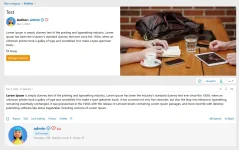
Above article header: Display a wide cover image above the title and article information. |
Style properties
Style properties: Select the layout and configure image cropping, visible article information, Hero dimensions, alignment, overlay, and content styling. |
![[XB] XFRM Resource Bump](/data/resource_icons/0/171.jpg?1733433532)
![[XB] Thread Bump](/data/resource_icons/0/271.jpg?1773917976)
![[XB] User Upgrade Statistics: Sales, Revenue & Retention Analytics](/data/resource_icons/0/387.jpg?1790708131)
![[XB] Profile Banner Log](/data/resource_icons/0/313.jpg?1777409557)
![[XB] Avatar Log](/data/resource_icons/0/311.jpg?1777374767)