Block reference
Announce an online, in-person or hybrid event with its dates, venue and programme. New event cards use the Compact layout.
Configure
- Choose Add block > Event card and enter a title.
- Optionally enter a description, venue or platform, address and completion message in each language tab.
- Set Event starts, Event ends and Event time zone. Enter programme times in that same zone.
- Choose Card, Prominent date or Compact. Compact omits the description and time-zone footer.
- Choose the event format and optionally enter a venue or meeting URL.
- Add programme items in the master language, then translate their titles and descriptions.
- Optionally configure an action button and its translated label, enable calendar downloads and save.
Fields
| Setting | Behavior |
|---|
| Title | Required in the master language; translated titles fall back to it |
| Description | Optional plain text; hidden in Compact layout |
| Venue or platform | Translated place or platform name |
| Address | Translated address, shown for in-person and hybrid events |
| Event starts / Event ends | Required; the end must follow the start, including events spanning multiple days |
| Event time zone | Shared IANA time zone used when entering event and programme dates |
| Venue or meeting URL | Optional shared link, available while the event is upcoming or live |
| Programme | Up to 10 items with shared start times and translated titles and descriptions |
| Expand the programme by default | Opens the programme when the page loads |
| Allow calendar download | Makes an .ics download available for upcoming and live events |
| Event cancelled | Overrides the automatic state and hides participation, calendar and programme controls |
| After the event ends | Keep the card with a message, or hide it |
| Completion message | Optional translated text; an empty value uses the standard completion message |
Dates and states
Times are stored in UTC. Visitors initially see their XenForo time zone and can select
Show event time. Dates, the date tile and programme times switch together. The event time zone remains shared across languages.
Dates in the missing or repeated hour during daylight-saving changes are rejected. Choose an unambiguous local time. A programme item must start within the event interval; it cannot start at or after the event end.
The card changes from Upcoming to Happening now at its start, then to Ended at its end. Participation and calendar buttons disappear after completion. Open pages update these time-based states without reloading. Changes made by an administrator, including cancellation, appear after refreshing the page.
The event interval is independent of page and row publication schedules. Those schedules can make the containing page or section unavailable earlier.
Programme and translations
Add, remove and move programme items in the master language. Their stable identities keep translations attached when reordered. An item without a translated title uses its complete master-language item, including the description.
Items can be removed until the programme is empty. A card without a programme omits its programme control. Without JavaScript, the native expandable programme and the initial visitor-time display remain readable.
Calendar downloads
Add to calendar downloads one .ics event with UTC start and end, translated text, venue, programme and a link to the page. Import the file into a compatible calendar application. It is a snapshot; later edits do not update an imported calendar entry automatically.
The download checks access to the page, row, placement and global source. Cancelled, completed, disabled or unavailable events cannot be downloaded through a direct URL. Calendar downloads are disabled in the unsaved ACP preview.
Global placements use the same calendar identity for their shared event. Copies and detached global blocks receive independent identities. XML and ZIP preserve UTC dates, settings and translations; imported pages start disabled.
Example
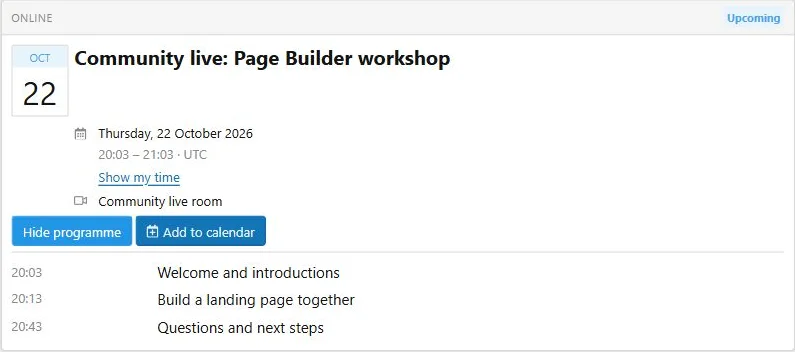
Create a community workshop, add welcome, practical session and questions to its programme, and use Prominent date on a landing page or Compact in a narrow column. Link the action button to the event discussion or registration page.
The compact card keeps dates, venue, programme and calendar controls readable in a narrow column.

![[XB] Page Builder: Visual Constructor for Custom & Landing Page](/data/resource_icons/0/398.jpg?1792180696)