Block reference
Each FAQ item is one collapsible question and answer. Add multiple FAQ blocks for a longer question list.
Configure
- Choose Add block > FAQ item.
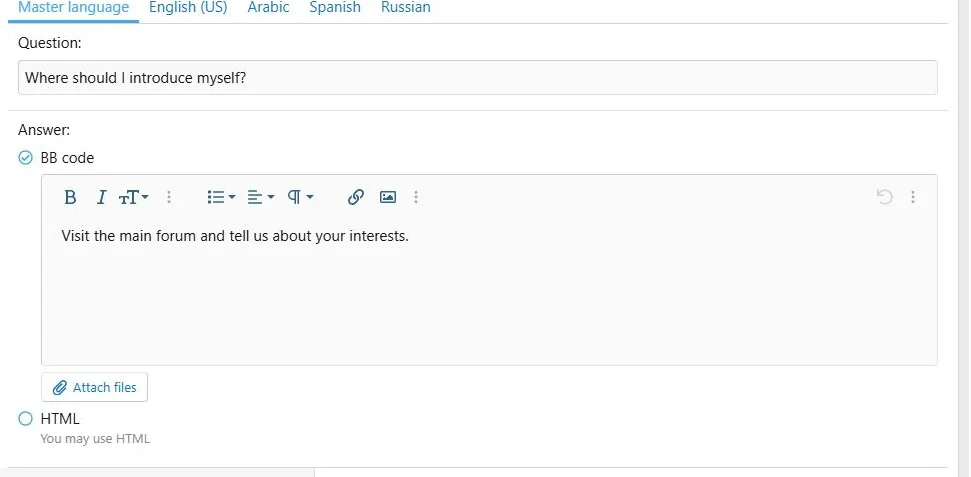
- Enter a complete question and answer in the master tab.
- Use BB code for rich content and supported attachments, or HTML for a custom answer.
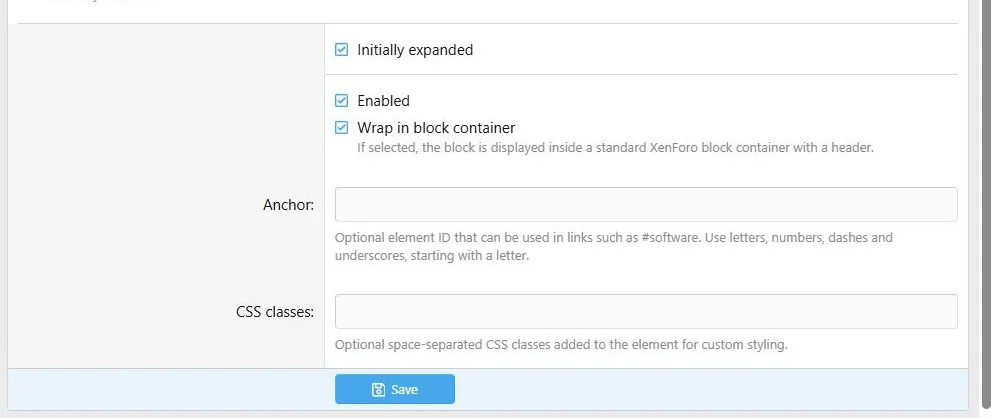
- Select Initially open when the answer should be expanded on page load.
- Choose the standard block container if appropriate.
- Save and test the question toggle on the public page.
Each FAQ item has its own question, answer and initial expansion state.
Additional presentation and behavior settings.
Translations
Provide both the question and answer in a language tab, or leave both empty. A partial translated pair cannot be saved. An empty pair uses the complete master-language item.
The question is the FAQ's own heading; it is not an optional generic block title.
Layout and transfers
Place consecutive items in one 12/12 column for a straightforward question list. Keep questions short enough to wrap clearly on phones.
Use ZIP for answers containing uploads. XML removes file references; an attachment-only answer can become empty and fail import validation.
Example
Add
How do I get started? and
Where can I ask for help? Open the first by default and leave the second closed.
Visitors expand individual questions without leaving the page.


![[XB] Page Builder: Visual Constructor for Custom & Landing Page](/data/resource_icons/0/398.jpg?1792180696)