Documentation home
Page Builder provides independent controls for internal search, sitemap inclusion, social metadata and noindex.
Choose the right control
| Goal | Setting |
|---|
| Include a page in XenForo search | Include in search |
| Make an eligible page available to the sitemap | Include in sitemap |
| Ask external search engines not to index the page | Noindex |
| Restrict who can open the page | User criteria |
| Temporarily take the page offline | Enabled or publication schedule |
Noindex is not an access rule. Sitemap exclusion alone does not prevent external indexing. The actual behavior of external search engines is outside Page Builder's control.
Configure discovery separately from social previews and visitor access.
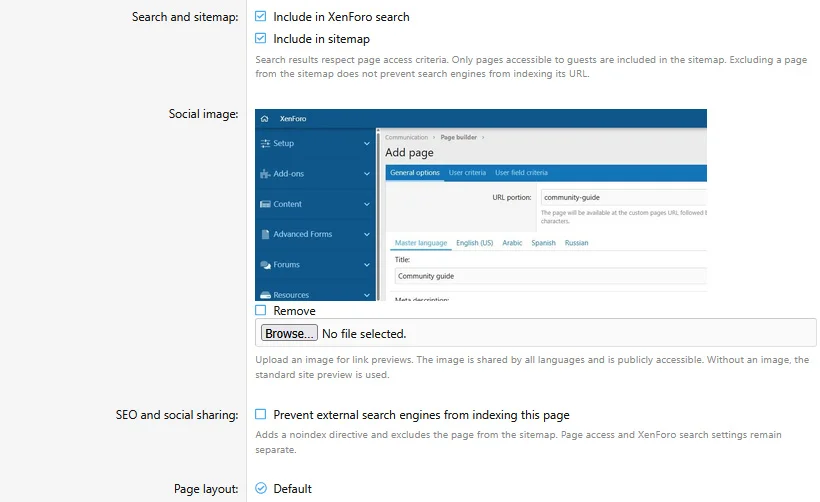
XenForo search
Enable
Include in search for pages that should appear in the main search and the dedicated
Search pages tab.
Page edits and block edits update the index. Existing pages can be indexed through XenForo's search index rebuild tool. Schedule boundary updates depend on the scheduled search maintenance task and XenForo job processing.
Search indexing includes supported static content and translations. Blocks with audience criteria and dynamic Widget, Forum threads and Featured resources output are excluded from indexed page text.
A page has one result across languages. Full-text searches include translations; title-only searches use the master title. Displayed titles and snippets use the visitor's language with fallback. Result access is checked for the current visitor.
Search pages returns accessible custom pages using localized titles and snippets.
Sitemap
A page must be published, accessible to guests, opted into the sitemap and free of noindex to be eligible. Sitemap URLs use XenForo-generated canonical routes and page modification dates.
Changes are reflected when XenForo rebuilds the sitemap. Saving a page does not mean an external search engine has fetched it.
Social previews
- Enter a meta description for the ordinary page description.
- Enter separate social title and description values when sharing needs different wording.
- Upload a social image.
- Add translated social text where needed.
Empty social text falls back to master social text and then the ordinary page text. The social image is shared by all languages. It is independent from Image blocks in the layout.
Copies receive independent social image files. ZIP exports include the file; XML does not.
Social metadata is emitted by the page. Public sharing services may cache an earlier preview, and guest access is required for them to fetch restricted content.
Canonical URLs and route filters
Canonical URLs are generated from the page route and XenForo configuration. There is no separate canonical URL input in the page editor. Use XenForo route filters when you need a different public path, and confirm the generated URL after saving.
Noindex and sitemap interaction
Enabling noindex excludes the page from the sitemap while preserving its sitemap preference. Turning noindex off restores eligibility according to that saved preference, publication state and guest access. XenForo search remains controlled by its own switch.


![[XB] Page Builder: Visual Constructor for Custom & Landing Page](/data/resource_icons/0/398.jpg?1792180696)