
Question types · Documentation
Ask the participant to select one answer from a list.
Configure
- Select Single choice from Add question.
- Enter the prompt and answer choices.
- Mark every accepted choice.
- Review scoring and optional randomization, then save.
Fields
Field Purpose Answer choices Candidate answers shown to the participant Correct choices One or more accepted alternatives Randomize answer choices Shuffle the choices where configured
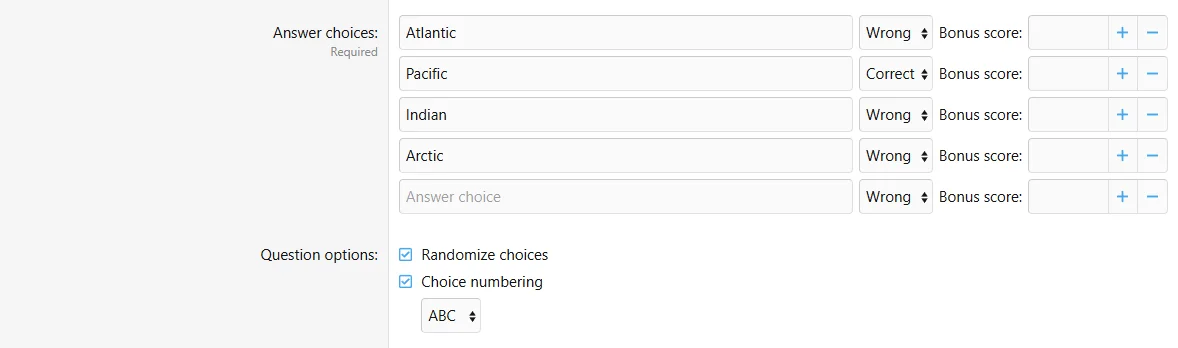
Configure the single choice fields in the authoring form.
Behavior and limits
An attempt submits one choice even if several alternatives are marked correct. For multi-selection, use Multiple choice. Shared scores, timers and explanations are described in question management.
Example
Ask which ocean is largest and mark Pacific as correct.
-
Before purchasing:
Please review the product description and compatibility requirements before placing your order. Contact us with any questions to confirm the product meets your needs. Refunds are not available once the product has been downloaded. By purchasing, you agree to our License Agreement. -
![[XB] Quizzes: Knowledge Tests & Community Engagement](/data/resource_icons/0/172.jpg?1733558394)
[XB] Quizzes: Knowledge Tests & Community Engagement 2.4.4
- Author Painbaker
- Creation date
- Featured