Documentation home
In the builder, open a column's
Add block menu, choose a type, complete the form and save.
Choose a block
| ACP type | Best for |
|---|
| Content | BB code articles or custom HTML |
| Call to action | Prominent headings and up to ten action buttons |
| Feature card | An icon, short explanation and optional button |
| Image | Uploaded images with alt text and captions |
| Gallery | Uploaded image collections with captions and image viewing |
| Testimonials | Curated quotes from members or custom authors |
| Roadmap | Milestones grouped by progress or displayed in order |
| Community team | Selected members or an automatic staff listing |
| Reactions | Reaction controls for a page or content block |
| Illustration | Built-in decorative artwork |
| FAQ item | One collapsible question and answer |
| Tabs | Related BB code sections in a tabbed interface |
| Stats | Manual counters or XenForo totals |
| Instruction steps | Numbered instructions |
| Comparison table | Plan or feature comparisons |
| Countdown | An event deadline and completion state |
| Event card | Event dates, venue, programme and calendar downloads |
| Forum threads | Recent threads from a selected forum |
| Discussion | Replies and quick reply from one linked forum thread |
| Featured resources | Featured Resource Manager entries |
| XFMG Media | Media category or album feeds and ordered media IDs / URLs |
| Widget | An existing XenForo widget |
| Global block | Reusable content managed from a shared source |
Common settings
| Setting | Purpose |
|---|
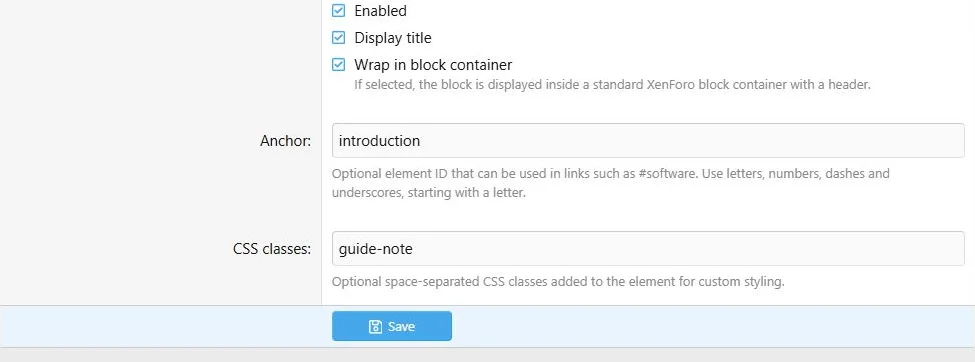
| Enabled | Allows the block to display when its page, row and audience rules allow it |
| Display title | Shows the standard heading where the block type supports it |
| Wrap in block container | Adds standard XenForo block presentation where available |
| Anchor | A direct fragment target, such as faq-membership |
| CSS classes | Space-separated class names for custom styling |
| User criteria | Restricts the audience for this block |
Some specialized blocks render their own headings or output, so the common title/container controls are not offered in every form.
Editors group settings into Content, Block Options, Appearance and Advanced sections where applicable. Visual selection cards choose the same layout options as the corresponding block settings.
Live preview
Use the ACP preview to review unsaved content, change the preview language and check narrow-screen presentation. Changes update the preview automatically. Illustration, Gallery and Forum threads show it beside the settings on wide screens and below them on smaller screens.
The preview uses the default public style and the selected content language, with master-language fallback. Automatic updates can be disabled; use Refresh for a manual update. The mobile control checks a width of 375 pixels.
Event card editors also show the preview beside settings on wide screens. The preview does not save the form. Save your changes and inspect the public page to check the complete layout and visitor permissions. See
block appearance for container overrides.
Common block controls handle visibility, containers, anchors and custom classes.
Text, buttons and translations
Content and FAQ use rich content fields. CTA, Feature card and several other specialized types use plain-text fields. Tabs accept BB code in their own item editor. Do not assume that HTML or attachment uploads are available in every type.
Button destinations and styles are shared settings; labels are translated content. Feature and button icons use Font Awesome classes and the Core Library picker where provided.
Use
Translations for fallback rules and
Appearance for page-wide presentation.
Copying
Duplicate a local block to reuse its configuration on the current page. A duplicate gets a unique anchor. Global placements still reference the same shared source; detach one if it needs independent editing.

![[XB] Page Builder: Visual Constructor for Custom & Landing Page](/data/resource_icons/0/398.jpg?1792180696)