Block reference
Use Call to action for a page introduction, campaign message or prominent link to another part of your community.
Configure
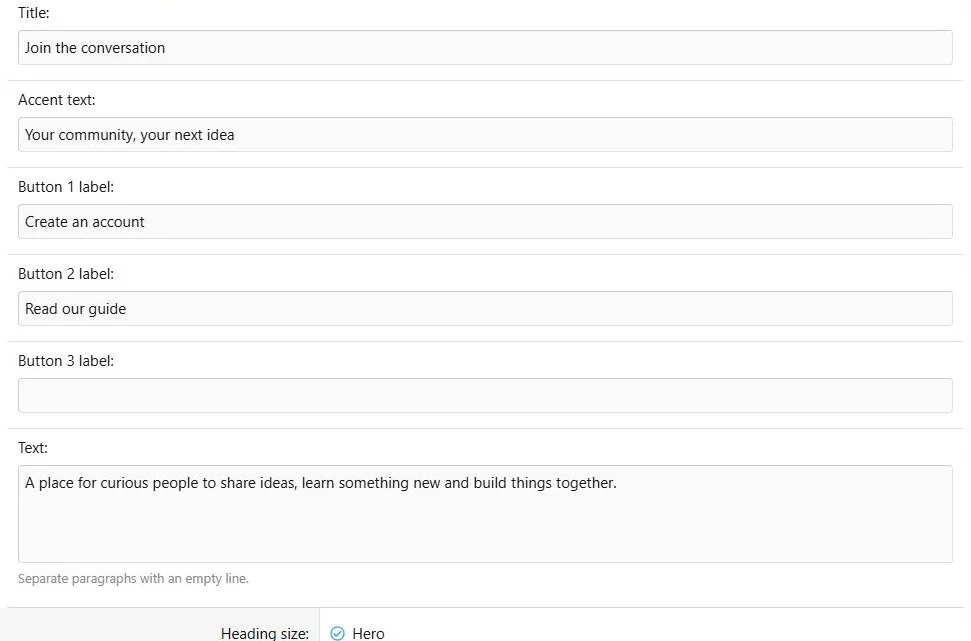
- Choose Add block > Call to action.
- Enter the required title and optional accent text.
- Add supporting text, separating paragraphs with a blank line.
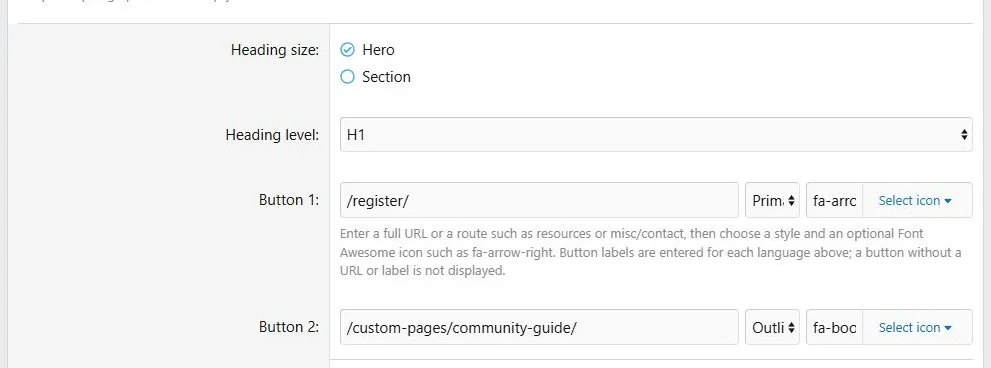
- Choose Hero or Section heading size and an H1, H2 or H3 heading level.
- Configure up to three buttons, including destination, style and optional icon.
- Enter each button label in the language content fields and save.
Settings
| Setting | Effect |
|---|
| Accent text | A short introductory line |
| Title | Main heading |
| Text | Plain-text supporting paragraphs |
| Hero / Section | Visual heading size |
| Heading level | Semantic heading element |
| Buttons | Up to three actions with shared destinations and translated labels |
Heading size and heading level are separate choices. Use an appropriate heading hierarchy when the page already displays its title.
Configure CTA wording, heading size and action buttons.
Additional presentation and behavior settings.
Translations and responsive behavior
Translate the title, accent, text and button labels. URLs remain shared across languages. Text fields do not provide the rich editor or attachment uploads.
Start with an 8/12 desktop column beside a 4/12 Image or Illustration column, with both 12/12 on narrow screens. Check long translated button labels.
Example
Use
Join the conversation with
Create an account and
Read our guide buttons. Set destinations to your actual registration and guide URLs.
A CTA directs visitors to the next useful action.
The same content at a phone viewport width of 390 pixels.



![[XB] Page Builder: Visual Constructor for Custom & Landing Page](/data/resource_icons/0/398.jpg?1792180696)