Block reference
Use Forum threads to show recent discussions from one selected forum.
Configure
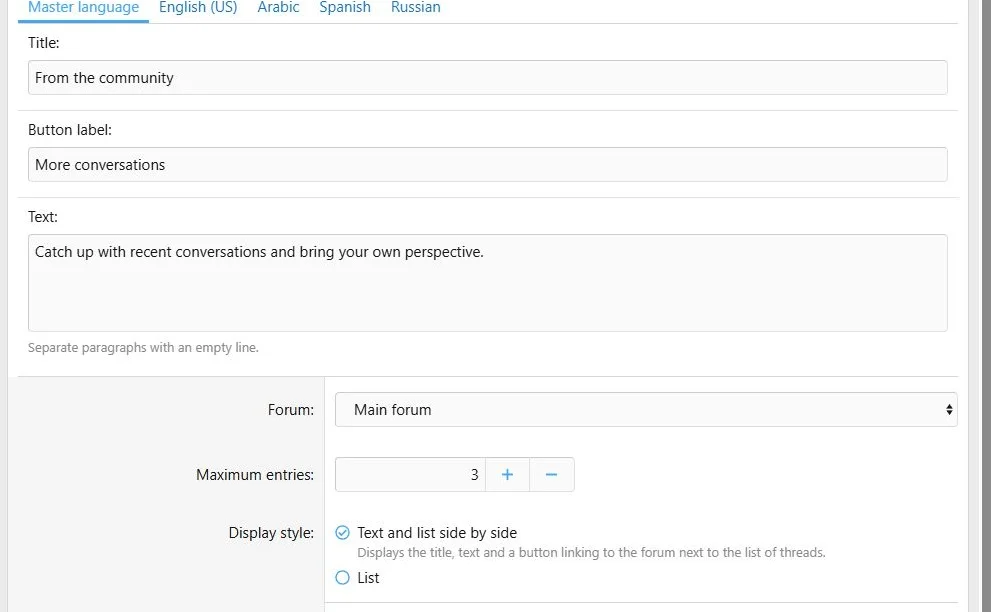
- Choose Add block > Forum threads.
- Add a heading and introductory text if useful.
- Select the source forum.
- Set Maximum entries between 1 and 20.
- Choose Text and list side by side or List display style.
- Fill any supporting link label offered by the editor and save.
The forum selector must point to a forum. Selecting None does not mean all forums.
Select a forum and choose the maximum number of recent threads.
Content and access
Threads are ordered by creation date, newest first. Redirect threads are excluded. Forum and thread visibility still depend on the visitor's XenForo access.
A visitor who cannot view the selected forum does not receive the forum panel. This can explain a difference between guest and administrator views.
The output is dynamic and is not indexed as static Page Builder page text.
Translations and layout
Translate the block's own text and labels. Thread titles and forum content come from XenForo; the block does not create translated copies of them.
Use Text and list side by side for a section with introductory content beside the thread list, or List for a simpler panel. The introductory paragraphs and forum button are part of the side-by-side style. Inspect the result on narrow screens.
Transfers
Forum data is not included in exports. Review the selected forum after import on another site; numeric forum IDs can refer to different forums.
Forum threads brings recent discussions into a custom page.


![[XB] Page Builder: Visual Constructor for Custom & Landing Page](/data/resource_icons/0/398.jpg?1792180696)