Documentation home
A page is available only when it is enabled, inside its publication period and accessible to the current visitor.
Enable or disable content
- Toggle a page in the page list or its settings.
- Toggle a row in its settings.
- Toggle a block in its editor or builder controls.
Disabling a page hides its entire layout. Disabling a row hides all content in that row. A disabled block remains in the builder for later use.
Schedule a page or row
- Open page or row settings.
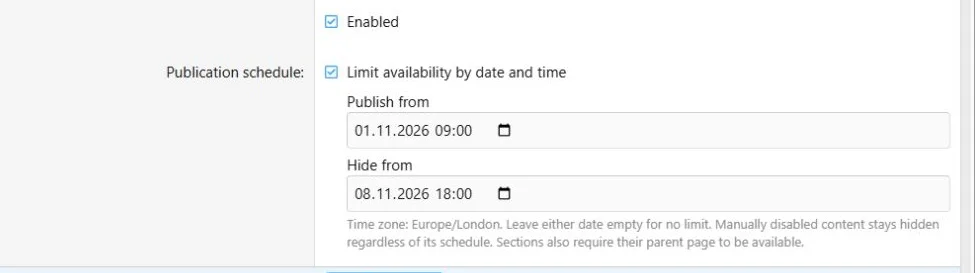
- Enable scheduling.
- Enter a start date, an end date, or both.
- Keep the content Enabled.
- Save and check the schedule status.
An empty start means no start restriction; an empty end means no end restriction. When both are set, the end must be later than the start.
Times use the XenForo time zone shown by the form. Verify the displayed zone before scheduling. A page or row is available at its start time and unavailable at its end time. Turning scheduling off clears its date restrictions when saved.
Publication dates use the time zone displayed in the editor.
A row cannot become visible while its parent page is unavailable. A countdown deadline is independent from publication scheduling.
Choose the audience
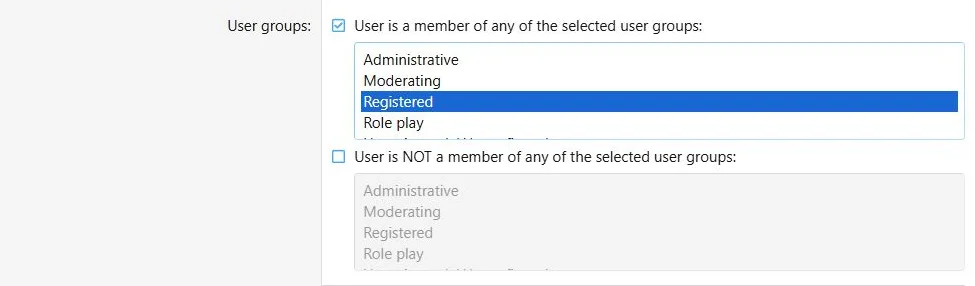
Open the user criteria tabs in a page or block editor and configure the intended audience. For example, limit a page to selected user groups, or show a promotion block only to visitors who meet its criteria.
Page criteria control the whole page. Block criteria add restrictions within that page; they cannot grant access to a restricted page. Rows have schedule and enabled settings, but no separate user criteria form.
Global placements must satisfy the criteria and enabled state of both their shared source and their placement.
User criteria determine which visitors can access a page or block.
Verify as the intended visitor
Check the page as a guest and a representative member. Administrative access to the builder does not bypass public availability checks.
View opens the real page, so disabled and out-of-schedule pages can return a not-found response.
For search engines and public sharing services to read a page, the page must be accessible to guests. Search and sitemap switches do not override audience rules.
Publication and discovery timing
Public availability is checked when a page is requested. Search index changes at schedule boundaries are maintained by a task scheduled every minute, subject to XenForo cron and job processing. Sitemap updates follow XenForo sitemap rebuilding.
See
Search and SEO for discovery controls.

![[XB] Page Builder: Visual Constructor for Custom & Landing Page](/data/resource_icons/0/398.jpg?1792180696)