- Xenforo.com resource URL
- https://xenforo.com/community/resources/ozzmodz-private-threads.5856/
- Compatibile XF2 versions
- 2.2
- 2.3
Create invitation-only private threads with configurable participants, roles, access requests, and visibility in XenForo.
Members can start restricted discussions, invite selected users, and manage access after the thread is created. Forum-level policies and permissions give administrators precise control over who can create, join, discover, and manage private threads.
Features:
Private Thread Access
 Public Descriptions: Add an optional plain-text description of up to 1,000 characters for discoverable private threads. Visitors with normal forum viewing permissions can read it without accessing messages or attachments. A dedicated forum permission controls who may enter descriptions; editing an existing description also requires participant-management access. Hidden threads do not expose descriptions.
 My Private Threads: A personal page under Forums with participating and managed threads, pending invitations, and access request statuses. Includes title search, forum filters, and pagination.
 Invitation-Only Threads: Restrict thread content to invited participants and authorized staff.
 Privacy Conversion: Allow selected users to convert existing public threads to private threads or return private threads to public access.
 Forum List Visibility: Choose whether private threads remain visible in forum lists while their content stays restricted.
- Custom Thread Titles: Add configurable text before or after private thread titles.
 Default Participants: Automatically invite a predefined list of users to new private threads.
Participant Management
 Member Management: Add or remove participants after a private thread has been created.
 Participant Roles: Assign owner, manager, member, or read-only access to control participation.
 Flexible Access Duration: Grant access for 24 hours, 7 days, 30 days, until a specific date, or without expiration.
 Invitation Confirmation: Require invited users to accept an invitation before receiving access.
 Pending Invitations on Threads: Owners and participant managers with permission to view participants can see pending invitations below the participant list. The thread header shows up to five names and links to participant management for longer lists. Declined and expired invitations are excluded.
 Invitation Access Checks: Optionally require current forum and thread viewing permissions when viewing invitation alerts, opening an invitation, or responding to it. Enabled by default; expired invitations are always rejected.
 Self-Service Exit: Let participants leave a private thread and immediately revoke their own access.
- Participant List Privacy: Control who can view the participants in a private thread.
Requests, Alerts & Limits
 Access Renewal Requests: Active temporary participants with the forum permission can request a longer access period. Managers review requests, select an expiry within forum limits, and approve or decline without changing participant roles. Requests require a reason, permit one pending request per participant, and enforce a 24-hour retry delay after rejection. Expired or changed access cannot be restored through an old request. Renewal forms are available from thread tools and My Private Threads.
 Access Requests: Let eligible users request access and provide a reason for the thread manager to review.
- User Alerts: Notify users about invitations, access requests, and request decisions.
 Forum-Level Limits: Set daily creation limits, total private-thread limits, participant limits, temporary-access limits, and allowed participant roles.
 Purchasable Limits: Allow users to purchase additional private-thread capacity through configured XenForo payment profiles.
 ACP Statistics: Review private-thread, participant, request, invitation, and purchase activity from a central dashboard.
- Optional Statistics Collection: Daily statistics collection is enabled by default and can be paused in the add-on options. Existing reports and current counts remain available. Collection resumes with new events; events during disabled periods are not backfilled, so daily, weekly, monthly, comparison, and financial reports may be incomplete. Thread limits, access, and payment processing continue to work.
XenForo Integration:
 Native Thread Workflow: Private-thread controls are integrated into thread creation, thread tools, forum lists, and standard XenForo overlays.
- Alerts: Access-related events use the XenForo alert system.
 Payments: Optional limit purchases use configured XenForo payment profiles and currencies.
- Forum Policies: Per-forum settings control default participants, visibility, requests, confirmation, durations, limits, and roles.
Permissions:
- Create Private Threads: Control who can create private threads and who can make any thread private.
- Invitations: Control who can be invited and whether users may invite only permitted members or any member.
- Visibility & Participants: Control list visibility changes and access to participant lists.
- Access Requests: Control who can request access and who can view, approve, or delete requests in their own or any private thread.
- Thread Conversion: Control conversion from public to private and from private to public.
- Moderator Access: Allow selected staff to view or manage any private thread and its requests.
- Free Limits: Configure daily and total private-thread allowances before additional capacity is required.
Requirements:
- XenForo 2.2.0+
Important Notes:
Useful for:
- Private Team Discussions: Create restricted threads for committees, staff groups, project teams, or selected members.
 Premium Communities: Provide controlled discussion areas without creating a separate forum for every audience.
 Client & Case Threads: Keep individual support, review, or collaboration threads limited to the relevant participants.
- Moderated Access: Let users request entry while thread managers retain approval control.
- Time-Limited Collaboration: Grant temporary access for events, trials, reviews, or short-term projects.
FAQ:
 Can an existing public thread be made private?Yes. Users with the appropriate permission can convert an existing public thread to private access.
- Can private threads appear in forum lists?Yes. Visibility can be enabled while full thread access remains limited to authorized participants.
- Can invited users be required to accept before viewing the thread?Yes. Invitation confirmation can keep access pending until the invited user accepts.
- Can participant access expire automatically?Yes. Access can last for a preset period, end on a specific date, or remain active without expiration.
- Can members purchase additional private-thread capacity?Yes. Administrators can enable purchases and configure the available payment profiles, currencies, and costs.
- Can moderators access private threads?Yes. Dedicated permissions control whether staff can view and manage any private thread or access request.
Screenshots:
Public Interface
Private threads remain visible in the forum list when visibility is enabled and are identified by a private-thread indicator. |
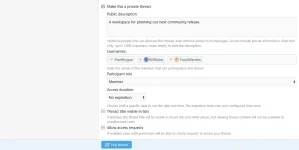
Create a private thread, invite participants, control list visibility, and allow access requests. |
Manage participants, access requests, and thread privacy from the standard thread controls. |
Review current participants, assign roles and access duration, remove members, or invite new users. |
Access Requests
Eligible users can request access when they open a private thread they cannot view. |
Members can include a required reason when submitting an access request. |
Thread managers can review, approve, or reject current and previous access requests. |
Thread managers receive an alert when a user requests access. |
Requesting users receive an alert when access is approved. |
Purchasable Limits
Users who reach their private-thread limit can open the purchase flow when paid extensions are enabled. |
Purchase one or more additional private-thread slots through a configured payment profile. |
Administration
Open user-specific private-thread limits from the XenForo Forums navigation. |
Configure default invited users, the forum overview button, and purchasable limit extensions. |
Control private-thread creation, invitations, requests, visibility, conversion, moderation, and free limits through XenForo permissions. |
Review and assign additional private-thread limits for individual users. |
Analyze private threads, participants, requests, invitations, purchases, trends, and top forums from the ACP dashboard. |