
![[XB] User Profile Music: Player, Playlists & Audio Uploads](/data/resource_icons/0/132.jpg?1732663597)
- Xenforo.com resource URL
- https://xenforo.com/community/resources/xb-user-profile-music.9322/
- Compatibile XF2 versions
- 2.2
- 2.3
Add music players, personal playlists, and audio tracks to XenForo member profiles with music uploads and SoundCloud integration.
User Profile Music lets members customize their profiles with music, upload and organize tracks, share songs, and control who can listen. Multiple player layouts, a sticky mini player, playback controls, listening history, and Now Playing widgets bring music into your community.
Administrators can configure audio formats, upload quotas, privacy permissions, player appearance, and music moderation.
Features:
Profile Music Players & Playback
 Profile Music Player: Add a built-in audio player to XenForo member profiles with Legacy, Cover, and Compact layouts.
 Three Player Layouts: Use the original Legacy design or responsive Cover and Compact layouts with artwork and automatic player height for uploaded audio.
 Collapsible Compact Playlist: Expand the Compact player's playlist beside the player on larger screens or below it on mobile devices.
 Sticky Mini Player: Continue listening across forum navigation by remembering the last track, playback position, volume, and playlist for resuming on the next page.
 Synchronized Playback Controls: Share playback state, progress, and volume between the profile player and mini player.
 Smart Mini Player Visibility: Automatically show the mini player when the profile player scrolls out of view, or optionally display both players together.
 Playback Controls: Play, pause, seek, and navigate between tracks.
 Repeat & Shuffle: Choose repeat off, repeat all, repeat one, or shuffle playback.
 Automatic Track Advancement: Automatically play the next available track when the current track ends.
 System Media Controls: Display track information and artwork in supported browser and operating system media controls, including playback, seeking, and playlist navigation.
- Player Customization: Configure layouts, dimensions, colors, icons, and containers through dedicated XenForo style properties.
 Track Sharing: Copy direct profile music links or embed individual tracks in forum posts using BB code.
 Track Autoplay Links: Share links that request playback of a specific track, subject to browser autoplay restrictions.
 SoundCloud Playback: Play imported SoundCloud tracks through their embedded player.
Music Uploads & Playlist Management
 Audio Uploads: Upload music files directly to member profiles using a drag-and-drop upload form.
 Multiple Audio Formats: Support MP3, OGG, WAV, and FLAC files, with independent format controls in the ACP.
 Automatic Music Metadata: Extract track titles, artists, albums, and durations from uploaded audio files.
- Personal Music Playlists: Organize uploaded tracks into a profile playlist.
 Track Ordering: Rearrange music tracks into a preferred playback order.
- SoundCloud Imports: Add tracks to a profile playlist using SoundCloud URLs without uploading the audio files.
 Track Play Counts: Display the number of plays for individual tracks.
 Upload Size Limits: Configure the maximum file size for music uploads.
 Track Duration Limits: Restrict the maximum duration of uploaded audio.
 Storage Quotas: Set maximum track counts and total music storage per member through XenForo user group permissions.
Music Privacy & Access
 Profile Music Privacy: Let members choose whether their music is available to everyone, registered members, people they follow, or nobody.
 Individual Track Privacy: Allow members with permission to restrict individual tracks separately from their overall profile music audience.
 Track Audience Inheritance: Let tracks inherit the profile's privacy settings or use stricter access restrictions.
 Privacy Configuration: Enable or disable member-controlled profile music privacy from the ACP.
 Persistent Privacy Restrictions: Preserve existing track privacy rules even if a member later loses permission to manage them.
 Permission-Based Listening: Respect profile and individual track privacy when displaying or playing music.
Listening History & Activity
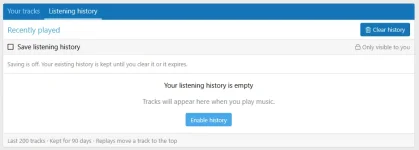
 Private Listening History: Let members review recently played tracks in a private history tab.
 Listening History Storage: Remember up to 200 unique tracks for 90 days across devices.
- Recent Listening Order: Move tracks to the top of listening history when they are played again.
- History Privacy: Display previous tracks only while the member still has permission to access them.
 History Management: Allow members to disable history recording, remove individual entries, or clear their entire listening history.
- Now Playing Widget: Show tracks currently being played by online members in sidebar or homepage widget positions.
 Online Listening Activity: Optionally display the current track and profile owner in XenForo's online users list.
 History Without Upload Permission: Allow members to use private listening history without permission to upload their own music.
Moderation & Administration
 Music Reports: Report profile music through XenForo's native reporting system and Report Center.
 ACP Music Management: Review and manage uploaded tracks from the Admin Control Panel.
 Soft & Permanent Deletion: Remove tracks from public view, restore deleted music, or permanently delete tracks individually or in bulk.
- Deletion Reasons: Allow moderators to provide a reason when removing music.
 Owner Notifications: Optionally notify track owners about moderation actions.
- Moderator Log: Record supported music moderation actions in XenForo's moderator log.
- Hidden Track Protection: Exclude deleted tracks from public playlists, embedded players, Now Playing widgets, and listening activity.
- Playback Access Checks: Recheck access to actively playing tracks periodically to enforce changes in visibility.
- Deleted Track Storage: Retain files for soft-deleted tracks and include them in storage quotas until permanently removed.
Permissions:
- View Profile Music: Control which members can access music on user profiles.
- Upload & Manage Music: Control who can upload and manage their own music tracks.
 Maximum Music Tracks: Set the number of tracks members can store.
- Maximum Music Storage: Configure total music storage limits by user group.
- Manage Track Privacy: Allow members to control the audience for individual tracks.
- Report Music: Control who can submit reports about profile music.
- Music Moderation: Separately control unpublished playback, deletion, restoration, and permanent deletion.
Requirements:
 XenForo 2.2.0+
 PHP 7.2.0+
 Browser Compatibility: Audio format support and system media controls depend on the visitor's browser and device.
Useful for:
 Music Communities: Give members a place to showcase favorite tracks, recordings, and personal music collections.
 Artists & Musicians: Let creators share original recordings, demos, and music directly from their profiles.
- Personalized Profiles: Allow members to express their identity and interests through profile music and playlists.
 Fan Communities: Encourage music discovery and interaction around members' shared musical interests.
 Casual Listening: Let visitors listen while browsing discussions and resume playback after navigating between pages.
- Private Audio Sharing: Support personal or limited-audience music collections without exposing every track publicly.
FAQ:
 Does playback continue uninterrupted when navigating between pages?
XenForo performs full page reloads. The mini player remembers the track, playlist and position so members can resume playback on the next page; uninterrupted playback across page reloads is not available.- Do privacy settings restrict the original SoundCloud recording?
No. They control access within XenForo and do not change access to the recording on SoundCloud or revoke previously shared public cover image URLs. - Do new uploads require moderator approval?
Automatic pre-approval is not enabled. New uploads are publicly available subject to profile and track privacy settings. - Can members use listening history without uploading music?
Yes. Members who can access profile music can use the private history tab without upload permission. History recording is optional.
Screenshots:
Profile player layouts
Profile music player with artwork and an expanded playlist. |
Compact layout with the playlist toggle on the right. |
Member music management
Manage uploaded tracks, reorder music, import a SoundCloud URL and upload audio. |
Add a music track through the upload form. |
Administration and styling
Dedicated style properties for the player layout, colors, icons and containers. |
Examples of profile music access and upload-limit permissions. |
Manage member music uploads from the admin control panel. |

![[XB] Page Builder: Visual Constructor for Custom & Landing Page](/data/resource_icons/0/398.jpg?1792180696)
![[XB] Custom Field Display Options: Lists, Labels & Layouts](/data/resource_icons/0/290.jpg?1792310126)
![[XB] Giveaway Threads: Prize Giveaways, Contests & Winner Draws](/data/resource_icons/0/400.jpg?1792609911)
![[XB] Patreon Integration](/data/resource_icons/0/321.jpg?1780346099)
![[XB] User Upgrade Purchase Goals: Funding Goals & Revenue Targets](/data/resource_icons/0/391.jpg?1791322459)