
![[XB] Advanced Forms: Surveys, Questionnaires & Multi-Page Form Builder](/data/resource_icons/0/312.jpg?1777396729)
- Xenforo.com resource URL
- https://xenforo.com/community/resources/xb-advanced-forms.10479/
- Compatibile XF2 versions
- 2.2
- 2.3
Create configurable forms for applications, requests, reports, surveys, and other structured submissions in XenForo.
Advanced Forms provides form building, access control, reporting, paid submissions, automation, and submission analysis in one add-on.
Features:
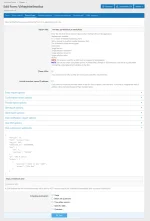
 Form builder: Create unlimited form types, forms, pages, and questions. Reuse default question sets across forms, copy questions in batches, and publish forms as widgets.
 Multi-page forms: Validate each page before moving on, show a progress indicator, and use answer-based rules to jump to another page.
 Conditional questions: Show questions only when earlier answers match configurable AND/OR condition groups.
 Printable preview: Let visitors review all pages, choices, and conditional questions before starting a form without creating a draft.
 Auto-save and resume: Save changes as users fill out a form, restore signed-in drafts across devices, and optionally provide guests with private resume links.
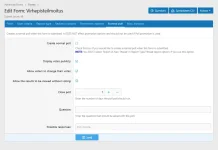
 Submission identity: Allow anonymous, private account-linked, or publicly attributed submissions per form.
 Completion page: Optionally display submitted answers and a link back to the prefilled form.
 Answer editing: Allow administrators and, when configured, the original respondent to edit submitted answers with a complete change history.
 Access control: Restrict form types and individual forms by user groups or criteria, optionally show forms publicly while limiting submission access, and configure a custom access error.
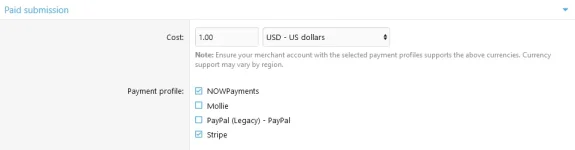
 Paid submissions: Sell submission access with XenForo payment profiles, coupon codes, usage limits, date ranges, user criteria, and payment-profile restrictions.
 Form presentation: Use Font Awesome or uploaded form icons, grid or list layouts, and dedicated style properties for cards, actions, spacing, and colours.
 Extensible question types: Each question type has its own handler and templates, allowing other add-ons to register additional types.
Notifications and automation:
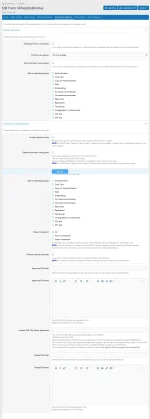
 Forum reports: Create threads or posts from submitted answers, with a configurable destination forum, prefixes, and report content.
 Email and direct messages: Send notifications to staff or submitters, including links to created threads where applicable.
 Alerts and push notifications: Notify selected users when a form is submitted, optionally only for a matching answer.
 Webhooks: Send successful submissions as JSON payloads to one or more external URLs.
 Form watching: Allow permitted users to watch a form from its statistics page for new-submission alerts and optional emails.
 Promotions and polls: Promote users on submission, use form poll results in promotion rules, and support standard XenForo polls.
 Forum integration: Open forms from new-thread creation or replace/prepend a form action in configured forums.
Reporting and statistics:
 Public statistics: Publish aggregate statistics to form viewers or permitted groups, with admin-only answers excluded.
 Response browsing: Optionally let permitted signed-in users browse individual responses without exposing protected answers or private identities.
 Per-form analytics: View submissions over time, unique and guest submitters, question breakdowns, numeric averages and medians, and answer rates.
 Completion-time tracking: Measure active completion time across pages and resumed drafts, excluding inactive tabs and payment delays.
 Forms overview: Review submission activity, revenue, the payment funnel, and forms that need attention from a single ACP dashboard.
 Submission logs: Filter logs and export detailed answers as CSV.
 Spreadsheet exports: Export one row per submission with stable, versioned question columns and downloadable schema manifests.
 XML portability: Export selected forms with their types and questions, then import compatible XML files.
Available question types:
All answer-bearing question types support the relevant shared settings, including required and default answers, conditional display, page placement, report visibility, read-only display, and stable export keys. Text and multi-line text: Placeholder, default value, regular-expression validation, custom validation message, and length limits.
- Email: Email-address validation with optional checking against the site’s banned-email list.
- Yes/No: Binary choice with an optional default answer.
 Single selection: Radio buttons or a searchable dropdown, choice columns, default answer, and an optional custom “Other” response.
 Multiple selection: Checkboxes or a multi-select list with minimum/maximum choices, custom validation, default answers, choice columns, and optional “Other” response.
 Agreement: A configurable confirmation checkbox.
 Date, time, and date & time: Past/future restrictions, comparison with another answer, and optional reporting in the submitter’s time zone.
 Number: Minimum/maximum values, default answer, expected-answer checks, and optional regular-expression validation.
 Range (slider): Configurable minimum, maximum, step, live value display, default value, and unit label.
 Range or exact number: A configured range selection or exact input with its own value constraints and unit label.
 Linear scale: Configurable endpoints, endpoint labels, and multiple display styles.
 Rating: XenForo’s standard star control with a configurable 2–10 star scale.
 Phone number: Input mask, server-side format validation, optional international format, and report links.
 Address: OpenStreetMap picker, address search, browser location, coordinates, default location, and zoom settings.
 Username: One or more XenForo usernames with optional autocomplete and default answer.
- WYSIWYG editor: Rich-text response with placeholder and length limits.
 File upload: XenForo attachments rendered as attachments, full-size images, or thumbnails in reports.
 Forum list: A selectable and optionally restricted forum list that can set a report’s destination forum.
 Thread prefixes: Select a prefix for a new-thread report.
 Billable row and total: Quantity-based paid items and calculated totals for a submission.
- Hidden value: Store a fixed value or submitter attribute without displaying a public input.
 Header phrase: Add headings or explanatory content between questions without storing an answer.
Requirements:
- XenForo 2.3.0 or later.
- A XenForo payment profile for paid submission access.
FAQ:
- Can I create multi-page forms with conditional questions? Yes. Forms can contain multiple pages, and questions or page jumps can depend on answers given earlier in the form.
- Can guests submit forms and resume them later? Yes. Forms can accept guest submissions, and private guest resume links can be enabled. Signed-in users can restore their drafts across devices.
- Can I limit who can view or submit a form? Yes. Access can be controlled by user groups, user criteria, and individual form permissions. A form can also remain publicly visible while submissions are restricted.
- Can users pay before submitting a form? Yes. Paid submission access uses XenForo payment profiles and can include coupons, usage limits, date ranges, and user criteria.
- Where are submitted answers stored and reviewed? Submissions are available in the XenForo Admin control panel, where authorized administrators can filter logs, review answers, edit responses, and inspect edit history.
- Can form submissions create threads or posts? Yes. A submission can create a new thread or a post in an existing thread, with configurable forums, prefixes, and report content.
- Can I receive notifications when someone submits a form? Yes. Advanced Forms supports email, direct messages, XenForo alerts, push notifications, watched-form notifications, and webhooks.
- Can respondents submit anonymously? Yes. Depending on the form settings, respondents can submit anonymously, privately through their account, or publicly with their username.
- Can submitted data be exported? Yes. Submission logs and answers can be exported to CSV, including a spreadsheet-oriented format with stable question columns. Forms can also be exported and imported as XML.
Useful for:
- Applications: Staff, membership, and access requests.
 Support and reports: Structured bug reports, support requests, and incident forms.
- Surveys: Multi-page questionnaires with conditional paths and response analysis.
- Registration and intake: Collect detailed information in a repeatable workflow.
 Automation workflows: Trigger reports, notifications, promotions, and external webhooks after submission.
Please consider sharing your experience with a short review. Every bit of feedback matters.
Screenshots:


![[XB] Toplist Threads: Community Rankings & Voting](/data/resource_icons/0/373.jpg?1789121547)
![[XB] Account Switcher: Login as User & Multiple Accounts](/data/resource_icons/0/372.jpg?1789019576)
![[XB] Hide Reactions: Anonymous Reactions, Privacy & Visibility Controls](/data/resource_icons/0/15.jpg?1781358875)
![[XB] Book Database](/data/resource_icons/0/356.jpg?1786480797)
![[XB] Movie & TV Database](/data/resource_icons/0/346.jpg?1784211453)