Documentation home
Use a global block for content shared across pages, such as a membership call to action or a recurring help message.
A global block is the shared source. A
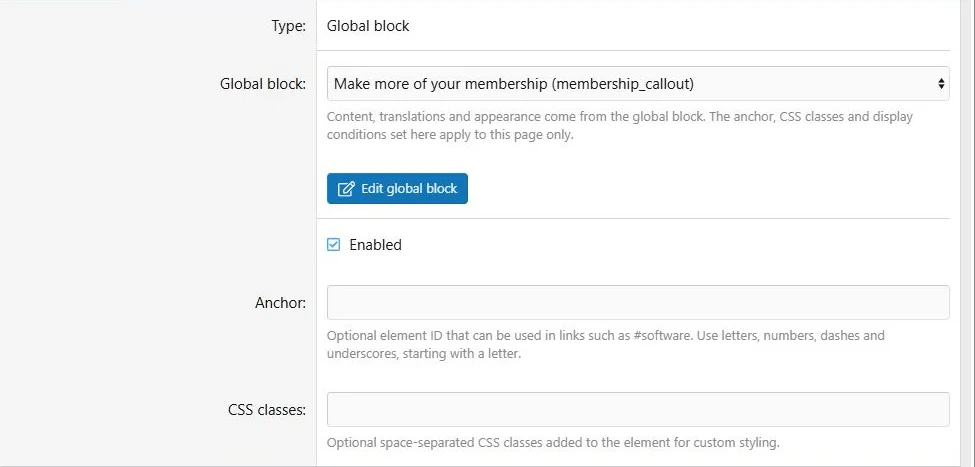
Global block block in a page is a placement that points to that source.
Create a shared source
- Open Communication > Global blocks in the ACP.
- Add a global block and choose a content type.
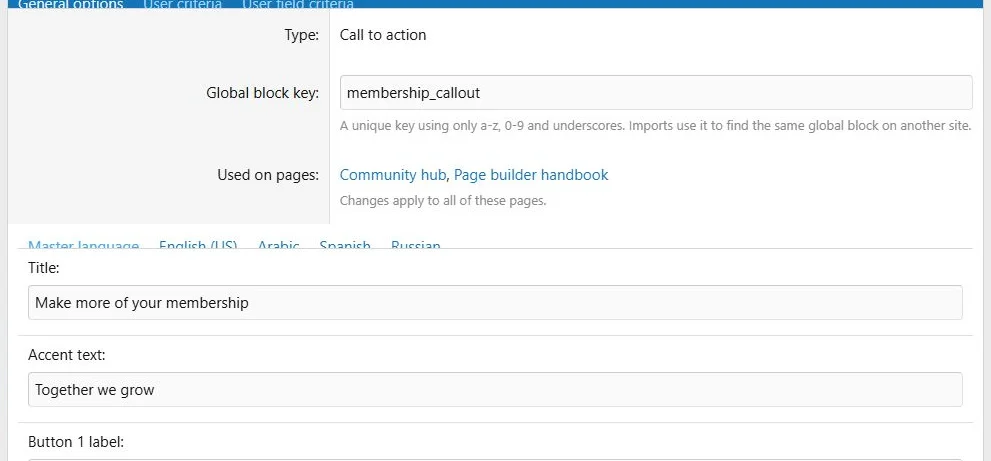
- Enter a unique global key, such as membership_callout.
- Complete the source content, translations and options.
- Save.
The key identifies the source during transfers. Use a descriptive key that will not accidentally match unrelated content on another site.
Edit shared content once and see the pages that use it.
Add it to a page
- Open the page builder.
- In the target column, choose Add block > Global block.
- Select the shared source.
- Configure placement availability, audience criteria, CSS classes and anchor as needed.
- Save and inspect the public page.
Each global source can appear only once on the same page. A global source cannot contain another global block.
Placements select a shared source and keep their own page-specific controls.
Shared and local settings
| Shared source | Individual placement |
|---|
| Text and translations | Position in the layout |
| Images and attachments | Anchor |
| Block type and type-specific options | Additional CSS classes |
| Source presentation settings | Placement enabled state |
| Source audience criteria | Additional audience criteria |
Both the source and the placement must be enabled and pass their audience rules. Editing the source updates all linked pages.
Convert an existing block
Use the block's
Make global action in the builder and provide a global key. The page then uses a placement of the shared source. Review the source before adding it to other pages.
Detach a placement
Use
Detach when one page needs an independent version. It becomes a local block with copied content and files. Future edits to the global source no longer update that block. Review the resulting criteria and appearance after detaching.
Copying a page or row does not detach global sources.
Delete a source
A source that is still used cannot be deleted. Remove or detach all its placements first. The source editor's usage list helps you find them.
Transfer behavior
Exports include referenced global definitions. An import reuses an existing destination source with the same key instead of overwriting it. See
Import and export.

![[XB] Page Builder: Visual Constructor for Custom & Landing Page](/data/resource_icons/0/398.jpg?1792180696)