Documentation home
Choose ZIP when moving pages containing uploaded files. XML transfers content and settings without those files.
Format comparison
| Content | ZIP archive | XML |
|---|
| Pages, layout, text and translations | Included | Included |
| Row and block settings, schedules and page CSS | Included | Included |
| Referenced global block definitions | Included | Included |
| Image block uploads | Included | Not included |
| Page social images | Included | Not included |
| Supported block attachments | Included | Not included |
| External websites and externally hosted media | Not downloaded | Not downloaded |
| XenForo widget definitions, forums and resource data | Not transferred | Not transferred |
| XenForo styles and style properties | Not transferred | Not transferred |
ZIP actions require PHP ZipArchive support.
Export one page or all pages
- Open Communication > Page builder.
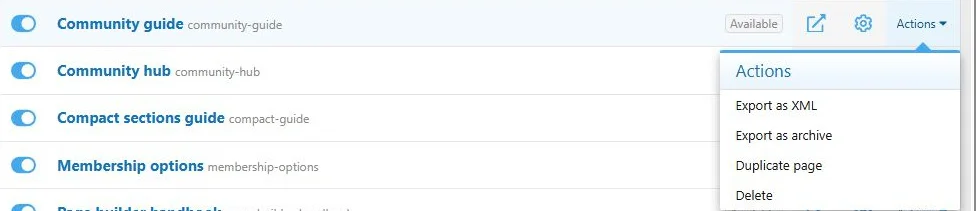
- For one page, open its Actions menu.
- Select Export as archive or Export as XML.
- To export all pages, use the page list's top-level Export menu.
Keep the original export when transferring between sites.
Use the page action menu to export an individual page.
Import
- Configure the required XenForo languages and dependencies on the destination.
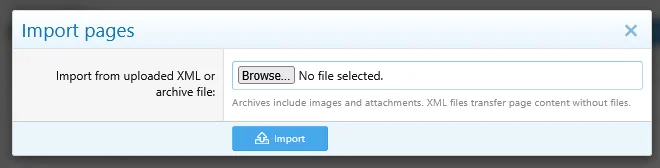
- Open Import from the page list.
- Upload the ZIP or XML file.
- Open the imported page in the builder.
- Review its settings and content before enabling it.
Imported pages start disabled. If a URL portion is already taken, the importer generates a unique one instead of overwriting that page.
Upload an archive to transfer page content and supported files.
What to review after import
- Page address: A conflict can change the imported URL portion.
- Languages: Matching uses language codes and, where needed, titles. Unmatched languages are skipped; ambiguous matches can reject the import.
- Schedules: Exported dates remain dates, so an imported schedule may already have ended.
- Criteria: User groups and other criteria must make sense on the destination.
- Forum threads: Select the correct destination forum. Numeric IDs are not portable identifiers.
- Widgets: The destination needs the referenced widget key and a compatible widget configuration.
- Resource blocks: Resource Manager and eligible featured resources must exist.
- Links and CSS: Review ordinary URLs and site-specific selectors. Supported attachment links and references are remapped during archive import.
- Appearance: The destination site's style properties are separate from the page export.
Global block key collisions
If the destination already has a global block with the same key, the import reuses that existing global block instead of replacing its content. Choose keys deliberately and inspect imported placements.
XML limitations
XML does not carry uploaded files. Attachment references are removed where the importer processes them without files. A FAQ answer consisting only of attachment references cannot be imported if this leaves the required answer empty. Use ZIP for such pages.
An imported Image block without its file needs a new upload before it can display its image.
Copying on the same site
Use Duplicate page when you need a local copy. It receives a unique URL, starts disabled and has independent supported uploaded files. Global placements remain linked to their shared sources; detach them for independent editing.

![[XB] Page Builder: Visual Constructor for Custom & Landing Page](/data/resource_icons/0/398.jpg?1792180696)