
![[XB] Quizzes](/data/resource_icons/0/172.jpg?1733558394)
- Xenforo.com resource URL
- https://xenforo.com/community/resources/xb-quizzes.9623/
- Compatibile XF2 versions
- 2.3
Unlock the full potential of your community's learning and engagement with our powerful quiz management system. Ideal for educational online courses, exams and tests, integrating gamification.
Commissioned by @PhineasD
Features:
Categories with Flexible Permissions:
 Adaptive Access Control: Flexibly control who can create quizzes, add questions, and participate.
 Guest Access: Allow both registered users and guests to play.
 Watch categories: Receive notifications when someone adds new quiz within watched categories
Quizzes:
 Variety and Customization: Create customizable quizzes with options like changing answers, randomizing answer orders, and allowing users to navigate back to previous questions.
 Sequential Response: Ensure users answer questions one at a time for a structured experience.
 Interactive Discussions: Add dedicated discussion threads to quizzes for questions and insights.
 BB Code Embed: Insert quizzes anywhere using simple BB code.
 Answer Sound Effects: Play distinct sound effects based on whether the selected answer is correct or incorrect.
 Answer Visual Effects: Display configurable visual effects for correct and incorrect answers, with global defaults and per-question overrides.
Tournament quizzes:
Elimination-style brackets where items go head-to-head and only the winner advances. Head-to-head matches: Two items are shown at a time, one click sends the winner to the next round.
 Bracket size: Play with all items or limit a bracket to 4, 8, 16, 32, 64 or 128 of them, optionally letting players choose.
 Random seeding: Shuffle the pairings on every play so no two runs are the same.
 Community picks: Show how often each item is picked by other players, and crown the most popular champions on the quiz page.
 Full bracket on results: The finished bracket and the champion are shown once the last match is played.
 Optional scoring: Tournaments use the regular quiz score and can be excluded from the score and the leaderboard.
Music quizzes:
Listen to a short snippet of a track and guess the song. Audio questions: Every question carries one audio file, played through a built-in player instead of being offered as a download.
 Difficulty: The snippet is 5, 3 or 1 second long on easy, normal and hard, or a custom length set by the author. Players may be allowed to pick the difficulty when they start.
 Replays: Optionally let players hear the snippet again, with an optional limit on how many times.
 Start offset: Each question defines the position in the track the snippet starts at, so the chorus can be used instead of the intro.
 Volume: The author sets the starting volume, and each player's own choice is remembered across questions.
 Difficulty scoring: Optionally multiply the score of a play by the difficulty it was played with.
 Hidden titles: Audio is streamed through a neutral URL, so the file name never reveals the answer.
Questions:
 Question Types:
- Single Choice - Select one option as the answer (can have one or more correct options).
- Short Answer - Provide a brief written response to the question.
- Answer ordering - Arrange the answers in the correct sequence.
- Answer ordering into groups - Sort answers into their appropriate categories or groups.
- Answer Time Limits: Set an optional answer time limit for each question with a dynamic countdown timer on the answer form.
 Answer Explanations: Provide correct answers with explanations for educational feedback.
Feedback System:
Show users their results explanations after quiz completion based on total score or answered questions.- Grade feedbacks: Displays a heading, message, and a label under the progress circle. Controls the visual styling of result elements according to the score.
- Scale feedbacks: Displays a visual score scale and highlights the user's position based on the total points earned in the quiz.
 Alert feedbacks: Displays an alert box with a custom message and style (success, warning, error, info) to provide important information or guidance based on quiz results.
 Summary feedbacks: Displays a summary message based on the user's quiz performance, with conditions based on score or specific answers.
 Performance highlights: Display visual indicators that emphasize the user's result or performance level.
Team Management:
Collaborate on quizzes with a built-in team system designed for shared ownership and controlled access. Collaborative Editing: Invite team members to help manage quizzes.
 Configurable Permissions: Control who can edit quizzes, manage questions, and sort content.
- Team Member Limits: Set a maximum number of collaborators per quiz.
 Invitation Alerts: Notified users receive alerts when they are invited to join a quiz team.
Quiz ratings:
 Single Rating with Detailed Feedback: Let users rate quizzes with a simple overall score, and optionally provide more detailed feedback.
 Sortable by Rating: Let users browse quizzes by highest-rated for quality discovery.
Play & Completion Statistics:
 Detailed Results: Allow users with permissions to view quiz results and individual answers.
- Time Tracking: Monitor the elapsed time for each answer to evaluate performance.
- Scoring: Display scores to assess user knowledge and engagement.
- Completion Announcements: Automatically post a message in the associated discussion thread when a user completes a quiz.
 View Counter: Track how many times each quiz has been viewed to gauge interest and reach.
Engagement Leaderboards:
 Global Leaderboard: Display the top performers across all quizzes.
 Per-Quiz Leaderboards: Show rankings for individual quizzes.
- Multiple Ranking Modes: Rank users by completions, total score, correct answers, average score, or average correct answers.
 Top Player Podium: Showcase the best performers in a visual podium layout.
 Monthly History: Keep monthly leaderboard records to track past results and long-term activity.
Import Questions:
 Moodle GIFT File Import: Easily import questions from Moodle GIFT files.
Seamless Integration with [XB] Lessons:
 Integrated Learning: Link quizzes with lessons to create a unified educational journey.
Useful for:
 Gamified Communities: Increase engagement through interactive and competitive quizzes
- Knowledge Challenges & Events: Host quiz-based contests and community challenges
- Educational Forums: Add learning tools without leaving the forum environment
 Online Courses & Training: Test knowledge and reinforce learning with structured quizzes
 Exams & Assessments: Run tests with scoring, time tracking, and detailed results
XF Core Integration:
- Custom fields support for quizzes
 Prefix support for quizzes
 Activity Summary
- Attachments for quizzes and questions
 Reactions for quizzes
 Bookmarks for quizzes
- News feed
- Tags
- Search
- Sitemap
 Spam cleaner
- Edit history
 Inline moderation tools:
 Delete/undelete/approve/unapprove quizzes, questions and ratings
- Delete quiz play attempts, quiz completion records
- Apply prefixes to quizzes
- Move quizzes to another category
 Move questions to new or existing quiz
 Reassign quizzes with discussion thread (optional)
- Feature/unfeature quizzes
 Moderator log
- Reports
 Warnings
- Drafts
- Alerts
- ACP stats
- ACP Logs: quiz completion log
- ACP batch update tool
 Adverting positions
 Widget positions
 Widgets:
- Quiz statistics
 New quizzes
- My ongoing quizzes
- Trending content
- Featured content
- Category progress
- What's new page support
 Captcha for guests
 Embed resolver
- Category watch
 Member stats
- Member view tab with quizzes created by user
- User criteria support for quizzes created count, quiz completions and quiz score
 Page criteria support for quiz categories
Recommended Extensions:
- [XB] Year Recap: Provides a yearly summary of user activity with statistics, leaderboards, and percentile comparisons
 [XB] Content Badges: Highlights valuable content with badges
 [XB] Scheduled Content: Schedules content publishing, including timed and recurring releases
- [XB] Auto Deleted Content: Automatically removes outdated or unwanted content
 [XB] Paid Content Featuring: Allows users to feature their content through paid placement
- [XB] Reported Content Quick Actions: Adds quick moderation actions to reported content
 [XB] Prefix Icon: Adds icons to prefixes for easier visual identification
- [XB] Content Title Control: Enforces title formatting and validation rules
 [XB] Custom Field Sorting: Enables sorting content by custom fields
 [XB] Prefix Sorting: Allows custom sorting of prefixes
- [XB] React as User: React on behalf of another user
 [XB] Reaction Control: Controls and restricts reaction usage
 [XB] Hide Reactions: Allows hiding and anonymizing reactions
See other Add-ons from the Collection:
https://xenbaker.com/toplists/user-engagement.6Still on an older version?
See what’s been added since.### 2.3.1
- Added an optional **Require all correct answers** setting for Multiple Choice questions
- Added Standard and Large drop zone layouts for **Answer ordering into groups** questions
### 2.3.0
- Added a new **Tournament** quiz type with elimination brackets
- Added a new **Tournament Item** question type with optional subtitles and images
- Added full comments support for quizzes and questions
- Added support for multiple accepted answers for Short Answer questions
- Added optional quiz start and end dates
### 2.2.4
- Added weekly or monthly leaderboard history snapshots
- Added per-category leaderboard participation controls
- Added a period selector to the Leaderboard widget
- Added a compact display mode for the Leaderboard widget
### 2.2.3
- Rebuilt answer visual effects using **Motion.js**
- Added an **Answer Effects** manager with JSON editing, validation, and live preview
- Added completed quiz tracking
- Added quiz completion user criteria
- Added support for triggering user group promotions after quiz completion
### 2.1.2
- Statistic block with rating distribution progress bars
- Quiz category page criteria support
-
 Previous & next quiz block on completion page (optional)
- More quizzes by author block on quiz view page (optional)
- Batch quiz completion deletion in ACP
### 2.1.1
- Category progress widget
### 2.1.0
- Quiz teams with permissions, limits, and invitations
- What’s New page support for quizzes
- Latest ratings & reviews block on quiz page
### 2.0.11 Patch Level 1
- Total quiz views statistic
### 2.0.11
- Grid display mode for quizzes with toggle
### 2.0.10
- Quiz batch update tool
- Quiz play time counter
- "My ongoing quizzes" widget
### 2.0.9
- Thumbnail optimization rebuild tool
- Multiple thumbnail sizes (small, medium, large)
- Separate quiz thumbnail edit action
- IP logging for quiz/question creation and thumbnail actions
- Associated content display in quiz tabs
### 2.0.8
- Multichoice question type
- Quiz ratings system (rating, moderation, reports, approval tools)
- Quiz view counters
- Question reassignment support
- User criteria (created, completed, score)
- Question bookmarking
### 2.0.7
- Option to skip quiz play confirmation form
### 2.0.6
- Completed quizzes member tab
- Quiz counters in member card
### 2.0.5
- Quiz category watch
- Member stats (most created / completed quizzes)
- "Quizzes" tab on member profile
- Option to show disabled "next question" button
### 2.0.4
- Quiz completion confirmation option
- Quiz featuring support
- Embed resolver support
### 2.0.3
- Quiz completion notifications in threads
- Attachment view permissions
- Reassign quiz discussion thread
- Hide inactive quiz discussions
- Admin navigation shortcut
- Latest answers section with filters
- Purge quiz attempts tool
- Sort best results by correct answers %
- Activity summary handler
- Question stats page
- Question sorting
- "In progress" quiz status
### 2.0.2
- New question types (ordering, grouping)
- Multiple correct answers support
- Completion without viewing all questions option
- Configurable length limits (quiz/question)
- Trending quizzes widget
- New quizzes widget
- Question type hints
- Inline moderation tools (plays & completions)
- Open Graph metadata
### 2.0.1 Patch Level 1
- Limit quickest results by fully answered attempts
- [QUIZ] BB-code embed
### 2.0.1
- Guest play data association after registration
- Per-question scoring
- Permission to view results
- Quickest results block
- Auto post on quiz completion
- Embed play form on quiz page
- Sort by last play/completion
- Average stats (score, time, correct %)
- Search filters for plays and completions
-
Added an optional **Require all correct answers** setting for Multiple Choice questions-
Added Standard and Large drop zone layouts for **Answer ordering into groups** questions### 2.3.0
-
Added a new **Tournament** quiz type with elimination brackets-
Added a new **Tournament Item** question type with optional subtitles and images-
Added full comments support for quizzes and questions-
Added support for multiple accepted answers for Short Answer questions-
Added optional quiz start and end dates### 2.2.4
-
Added weekly or monthly leaderboard history snapshots-
Added per-category leaderboard participation controls-
Added a period selector to the Leaderboard widget-
Added a compact display mode for the Leaderboard widget### 2.2.3
-
Rebuilt answer visual effects using **Motion.js**-
Added an **Answer Effects** manager with JSON editing, validation, and live preview-
Added completed quiz tracking-
Added quiz completion user criteria-
Added support for triggering user group promotions after quiz completion### 2.1.2
-
Statistic block with rating distribution progress bars-
Quiz category page criteria support-
Previous & next quiz block on completion page (optional)-
More quizzes by author block on quiz view page (optional)-
Batch quiz completion deletion in ACP### 2.1.1
-
Category progress widget### 2.1.0
-
Quiz teams with permissions, limits, and invitations-
What’s New page support for quizzes-
Latest ratings & reviews block on quiz page### 2.0.11 Patch Level 1
-
Total quiz views statistic### 2.0.11
-
Grid display mode for quizzes with toggle### 2.0.10
-
Quiz batch update tool-
Quiz play time counter-
"My ongoing quizzes" widget### 2.0.9
-
Thumbnail optimization rebuild tool-
Multiple thumbnail sizes (small, medium, large)-
Separate quiz thumbnail edit action-
IP logging for quiz/question creation and thumbnail actions-
Associated content display in quiz tabs### 2.0.8
-
Multichoice question type-
Quiz ratings system (rating, moderation, reports, approval tools)-
Quiz view counters-
Question reassignment support-
User criteria (created, completed, score)-
Question bookmarking### 2.0.7
-
Option to skip quiz play confirmation form### 2.0.6
-
Completed quizzes member tab-
Quiz counters in member card### 2.0.5
-
Quiz category watch-
Member stats (most created / completed quizzes)-
"Quizzes" tab on member profile-
Option to show disabled "next question" button### 2.0.4
-
Quiz completion confirmation option-
Quiz featuring support-
Embed resolver support### 2.0.3
-
Quiz completion notifications in threads-
Attachment view permissions-
Reassign quiz discussion thread-
Hide inactive quiz discussions-
Admin navigation shortcut-
Latest answers section with filters-
Purge quiz attempts tool-
Sort best results by correct answers %-
Activity summary handler-
Question stats page-
Question sorting-
"In progress" quiz status### 2.0.2
-
New question types (ordering, grouping)-
Multiple correct answers support-
Completion without viewing all questions option-
Configurable length limits (quiz/question)-
Trending quizzes widget-
New quizzes widget-
Question type hints-
Inline moderation tools (plays & completions)-
Open Graph metadata### 2.0.1 Patch Level 1
-
Limit quickest results by fully answered attempts-
[QUIZ] BB-code embed### 2.0.1
-
Guest play data association after registration-
Per-question scoring-
Permission to view results-
Quickest results block-
Auto post on quiz completion-
Embed play form on quiz page-
Sort by last play/completion-
Average stats (score, time, correct %)-
Search filters for plays and completionsScreenshots:
Public Interface:
Admin Interface:
ACP quiz completion log:
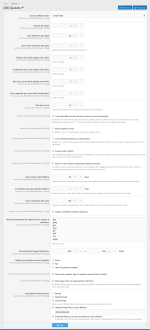
Options:
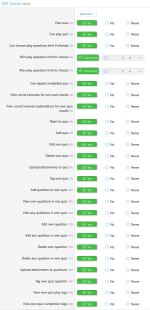
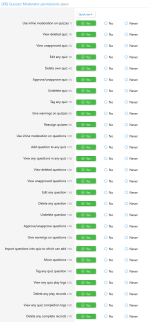
Permissions:

![[XB] Year Recap](/data/resource_icons/0/192.jpg?1771197211)
![[XB] Contact Users Presets](/data/resource_icons/0/365.jpg?1788129112)
![[XB] Scheduled Content](/data/resource_icons/0/196.jpg?1781993724)
![[XB] Daily Login Streak](/data/resource_icons/0/255.jpg?1774902389)
![[XB] Donations](/data/resource_icons/0/333.jpg?1781959400)