What's new
[XB] Quizzes

[XB] Quizzes [Paid] 2.1.3

You must log in or register to purchase ($55.00)
Enjoying this so far but seem to be having a small issue with the stats not automatically updating
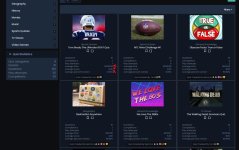
Screenshot_28-12-2024_202650_idlechatter.co.uk.jpeg

I have to manually run the Quiz rebuild caches to update the stats.

Also, I wonder if it would be possible to add another quiz format where the answers are given in order (I'd pay for this, if it is possible)

For example:

Question: "All these news events happened in 2024, order them from the earliest occurrence to the last"
Answers: You would then have a number of snippets and the quiz taker would order them 1-10.

I wonder if it would be possible to include a trending quizzes widget that works in the same way as trending threads in XF2.3
 
The average score statistic is also calculated when only 1 user has taken the quiz?
Last night 1 guest took a quiz and being the only attempt completed, it does not show the average score, but it does show the average duration and the percentage of correct answers.


Would it be possible to include an option so that the user has to view all the questions (even if they don't answer them) in order to complete the quiz? The current option is to complete the quiz without answering all the questions, not to complete the quiz without viewing all the questions.
I want to avoid having guests answer only 10 questions and complete the test when they haven't even viewed the remaining 90 questions.


The {count} parameter in the following phrase does not work:
ozzmodz_quiz_you_sure_you_want_to_move_x_quizzes
Are you sure you want to move {count} quiz(zes)?
 
Last edited:
Is it possible to have multiple correct answers for a question yet?
For example, pick 2 correct answers out of a choice of 5?
My current quiz addon have this option and I want to see if it's possible before moving to this.
Planned for the next update.

having a small issue with the stats not automatically updating

Screenshot_28-12-2024_202650_idlechatter.co.uk.jpeg


I have to manually run the Quiz rebuild caches to update the stats
The average score statistic is also calculated when only 1 user has taken the quiz?
Last night 1 guest took a quiz and being the only attempt completed, it does not show the average score, but it does show the average duration and the percentage of correct answers.
The {count} parameter in the following phrase does not work:
ozzmodz_quiz_you_sure_you_want_to_move_x_quizzes
Are you sure you want to move {count} quiz(zes)?

Fixed in upcoming update.

Also, I wonder if it would be possible to add another quiz format where the answers are given in order (I'd pay for this, if it is possible)

For example:

Question: "All these news events happened in 2024, order them from the earliest occurrence to the last"
Answers: You would then have a number of snippets and the quiz taker would order them 1-10.
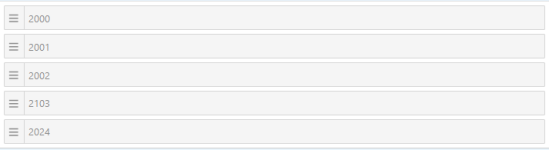
Do you mean draggable items as in XF sorting?

1735905297023.png

Would it be possible to include an option so that the user has to view all the questions (even if they don't answer them) in order to complete the quiz? The current option is to complete the quiz without answering all the questions, not to complete the quiz without viewing all the questions.
I want to avoid having guests answer only 10 questions and complete the test when they haven't even viewed the remaining 90 questions.

Yeah, that shouldn't be a problem. I'll contact you via PM.
 
Do you mean draggable items as in XF sorting?
Oh, yes. That would definitely work.

So you would have a question like, "Order these Hollywood actors by year of birth. Starting with the earliest". You'd then have a list of answers to sort, for example 10 actors, and you'd get a score for each correct one (set when making the quiz).
 
In case I want to remove the addon from an XF installation and move it to another one, how can I import the quizzes and questions? With the XF importer?
 
I'm having fun with this so far; nice job.
I am unsure if you have anything planned for this; I used a Quizzes app on IPS a few years back. When a user started a quiz and tried to click out of the screen to cheat and use Google, it came up with a message [ you can't do that ] or whatever message the admin put in there
 
@Painbaker, when we are building a quiz, is there a way for it not to show up in the forum until the quiz is completed? I had a user trying to play the quiz as I was building it; maybe you have something in there that I missed,
 
@Painbaker, when we are building a quiz, is there a way for it not to show up in the forum until the quiz is completed? I had a user trying to play the quiz as I was building it; maybe you have something in there that I missed,
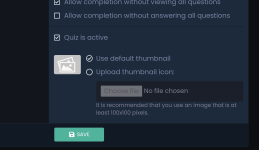
When creating a quiz, uncheck "Quiz is active" until you have finished compiling the questions

Screenshot_20250111_074834_Chrome.png
 
Painbaker updated [XB] Quizzes with a new update entry:

2.0.2

✏️ Changes:​

  • Added XF 2.3 requirement in addon.json
  • Added ability to disable max quiz score by setting option value to 0
  • Added horizontal divider between questions in quiz results
  • Changed the display location of quiz leaderboard to below the quiz description (can be reverted back in the style settings)

✨ New Features:​

  • Added new question types:
    • Answer ordering - Arrange the answers in the correct sequence...

Read the rest of this update entry...
 
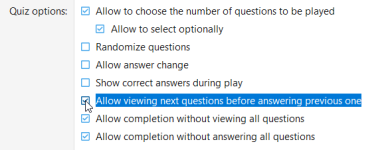
@Painbaker If I create a quiz with the following options, users cannot advance to the next questions if they do not answer the current one. However, they can correct the quiz without seeing all the questions.

NO - Allow completion without viewing all questions
YES - Allow completion without answering all questions
 
Also I've detected an error I already had in the past and were fixed (but has returned). When I reviewing the quiz result, the questions are arranged differently than how they were asked.

I have enabled the random questions option (obligatory for the user taking the quiz without being able to remove this option). If you need a link to test, let me know.
 
Hi @Painbaker,

I added a widget to the home page and selected “Standard” as the display style.
But the quizzes did not come up.
Only the title appears.

1736801688555.png

For your information
 
@Painbaker If I create a quiz with the following options, users cannot advance to the next questions if they do not answer the current one. However, they can correct the quiz without seeing all the questions.

NO - Allow completion without viewing all questions
YES - Allow completion without answering all questions
These options were not designed to affect the ability to change current answers
Is it required for you to be configurable for each quiz separately? Or a global option?

Also I've detected an error I already had in the past and were fixed (but has returned). When I reviewing the quiz result, the questions are arranged differently than how they were asked.

I have enabled the random questions option (obligatory for the user taking the quiz without being able to remove this option). If you need a link to test, let me know.
I can't reproduce this
Send me the link in a PM

Hi @Painbaker,

I added a widget to the home page and selected “Standard” as the display style.
But the quizzes did not come up.
Only the title appears.

View attachment 1459

For your information
Will be fixed.
Thanks for the report.
 
These options were not designed to affect the ability to change current answers
Is it required for you to be configurable for each quiz separately? Or a global option?

I think I have not expressed myself well. If I check the options Allow completion without viewing all questions (NO) and Allow completion without answering all questions (YES) in a quiz, I assume that the user is forced to view all the questions in order to correct the quiz, and that they can do so without having to answer all the questions.
If this approach is correct, when selecting these options in my quizzes the user cannot advance to see the following questions if they do not mark an answer in the question they are on. Shouldn't I be able to advance in the quiz without selecting an answer if I have precisely marked the option Allow completion without answering all questions (YES)?

I can't reproduce this
Send me the link in a PM

Sent it, thx!
 
Hi @Painbaker,

1736889093432.png

I would like to convey to you a detail that I have just noticed (a mistake in my opinion).
As you can see in the picture above, the tests were participated in.
However, the points and ratios that should be received are 0.
These are definitely not fixed without a manual rebuild.
Can you also review this part?

Thank you.
 
I think I have not expressed myself well. If I check the options Allow completion without viewing all questions (NO) and Allow completion without answering all questions (YES) in a quiz, I assume that the user is forced to view all the questions in order to correct the quiz, and that they can do so without having to answer all the questions.
If this approach is correct, when selecting these options in my quizzes the user cannot advance to see the following questions if they do not mark an answer in the question they are on. Shouldn't I be able to advance in the quiz without selecting an answer if I have precisely marked the option Allow completion without answering all questions (YES)?

The ability to go to another question without answering is controlled by another option:

1736894808299.png


I would like to convey to you a detail that I have just noticed (a mistake in my opinion).
As you can see in the picture above, the tests were participated in.
However, the points and ratios that should be received are 0.
These are definitely not fixed without a manual rebuild.
Can you also review this part?
Were the last games in these quizzes before the 2.0.2 update? This works correctly after the update on my test site
Try manually rebuilding the data and watch if the stats update with new quiz plays
 
The ability to go to another question without answering is controlled by another option:

View attachment 1466
Thanks, I can now move forward with the answers, but I still have another problem. From the first question, the button to completion the quiz is displayed, but I have not checked the option Allow completion without viewing all questions (NO).
In this case, shouldn't the button be displayed once I have viewed all the questions?


Edit.
It seems that the button is displayed correctly if I also uncheck the Allow completion without answering all questions option. In that case the completion quiz button is displayed when I have seen all the questions, but it is inactive because I have not answered all of them. I think there must be a conflict between both options.

What I would like with both options is that the user should see all the questions even if they do not answer them all in order to complete the quiz.
 
Painbaker updated [XB] Quizzes with a new update entry:

2.0.2 Patch Level 1

🪲 Fixes:​

  • Fixed different question order when playing quiz and viewing results when random order enabled
  • Fixed saving of decimal numbers in quiz average score statistics
  • Fix: prioritize "Allow completion without viewing all questions" quiz option when completion without answering to all questions is not allowed
  • Fixed "standard" style display in new quizzes widget

Read the rest of this update entry...
 
I've noticed that Google is indexing quiz pages with thin content, such as:

Code:
https://myforum.com/quiz/myquiz.1/play

Could you add a noindex tag in the next update so that it stops crawling these URLs? Thx.
 
@Painbaker

First of all, I want to say that this quiz module is fantastic! It’s well-designed, intuitive, and adds great value to our forum. We’ve already had a lot of fun using it, and I truly appreciate the effort put into its development. That said, after running a full quiz, we encountered a few areas where some improvements or updates would be greatly appreciated.

Important for me:​

  1. Reordering nested questions during quiz creation – This is crucial. I create quizzes progressively, and sometimes it would be very useful to move a question to a specific position. However, I couldn't find this option in the question overview. Would it be possible to add this feature?
  2. Removing user results/attempts – We urgently need a way for moderators to remove allanswers from a specific user so they can retake the quiz. We've encountered several user errors, and the current solution—manually removing the relevant records from the database—is cumbersome. It would be helpful to allow:
    • Removing all answers from a single user so they can retake the quiz.
    • Resetting an entire quiz for all users, similar to how polls work in XenForo.
  3. Sorting question type – On mobile devices (iPad/iOS), the hamburger icon for moving answers does not display.
  4. Displaying correct/incorrect responses for moderators – It would be useful to show which users answered a specific question correctly or incorrectly. Right now, I can look up each user’s response individually, but this is time-consuming.

Additional requests:​

  • Quiz evaluation (score-based messages) – This is more of a feature wish rather than a necessity. It would be great if quizzes allowed displaying a custom evaluation message based on score ranges or percentage success.
  • Marking a quiz as ‘In Progress’ – Would it be possible to visually indicate that a quiz is still being prepared? This would help distinguish it at a glance.
  • Admin settings enhancement – In the admin panel, could you add a "Quiz Options" section as the last item in the main navigation under “Quizzes”?
  • Better result overview in “Completed” section – Could you display the number of correct, incorrect, and unanswered questions at first glance (e.g., Answers: 10/2/0)?
  • Leaderboard improvement – Would it be possible to rank players based on percentage success rather than just points (as a configurable option)?
Again, great work on this module! It has incredible potential, and these tweaks would make it even better. Thanks for your time and consideration!
 
Removing user results/attempts – We urgently need a way for moderators to remove allanswers from a specific user so they can retake the quiz. We've encountered several user errors, and the current solution—manually removing the relevant records from the database—is cumbersome. It would be helpful to allow:
  • Removing all answers from a single user so they can retake the quiz.
  • Resetting an entire quiz for all users, similar to how polls work in XenForo.

I also thought this would be useful for test runs through the entire quiz while creating it.

Likewise, perhaps there could be a permission for users - so that, in the case of his permission, they could independently delete THEIR passages through the quiz.
 
Reordering nested questions during quiz creation – This is crucial. I create quizzes progressively, and sometimes it would be very useful to move a question to a specific position. However, I couldn't find this option in the question overview. Would it be possible to add this feature?
I'll take a look into this.

Quiz evaluation (score-based messages) – This is more of a feature wish rather than a necessity. It would be great if quizzes allowed displaying a custom evaluation message based on score ranges or percentage success.
The current architecture of the add-on was not designed for this. I'll take a look at how difficult it would be to implement.

Sorting question type – On mobile devices (iPad/iOS), the hamburger icon for moving answers does not display.
The built-in XF sorting script is used here
Is this also observed in ACP sorting? (like sorting smileys, reactions, nodes)

Removing user results/attempts – We urgently need a way for moderators to remove allanswers from a specific user so they can retake the quiz. We've encountered several user errors, and the current solution—manually removing the relevant records from the database—is cumbersome. It would be helpful to allow:
  • Removing all answers from a single user so they can retake the quiz.
  • Resetting an entire quiz for all users, similar to how polls work in XenForo.
Displaying correct/incorrect responses for moderators – It would be useful to show which users answered a specific question correctly or incorrectly. Right now, I can look up each user’s response individually, but this is time-consuming.
Admin settings enhancement – In the admin panel, could you add a "Quiz Options" section as the last item in the main navigation under “Quizzes”?
Better result overview in “Completed” section – Could you display the number of correct, incorrect, and unanswered questions at first glance (e.g., Answers: 10/2/0)?
Marking a quiz as ‘In Progress’ – Would it be possible to visually indicate that a quiz is still being prepared? This would help distinguish it at a glance.
Will be added in next update
 
Painbaker updated [XB] Quizzes with a new update entry:

2.0.3

✨ New Features:​

  • Added an option to enable notifications for quiz completion posts in discussion threads
  • Added separate permissions for viewing attachments
  • Added an option to reassign a quiz discussion thread to a new user using the reassignment tool
  • Added an option to hide discussion threads for inactive quizzes
  • Added an admin navigation item for quick access to add-on options
  • Added a section to display the latest user answers with filters on the...

Read the rest of this update entry...
 
Back
Top